
13 apps and projects I created with Claude Code and Codex: where each one helps
A guide by 13 projects of Dericson Calari: the problem that motivated each one, how the flow was thought, examples of use and the actual stage of the interfaces.

If you also can’t stop creating solutions with artificial intelligence, you probably know this sequence: a problem appears, you assemble a tool, start using it, and discover the next bottleneck. That’s how I built projects with Claude Code and Codex for different parts of my operation.
This guide shows what each project tries to solve, how I think the flow and what exists today. They Are 13 apps and projects, but that doesn’t mean 13 products ready to hire. There are interfaces implemented with demonstrative data, a pilot limited by external permission, a project in development and a concept that has not yet become an application. They are also not pieces of an already integrated suite. The links below show the working sequence of an operation; a precise technical integration of proof of its own.
I separate two words because they influence the decisions of this guide. First-party data collection is to collect and store the data on its own basis. Conversion tracking is to collect and inform the data to the traffic platform. The first-party data collection leaves the person smart. The conversion tracking leave the platform smart. A report screen only helps if the information that comes to it represents something that actually happened.
The map before opening the projects
Five questions that organize the operation
Where did you come from?
Origin of the conversation, visit, lead and sell.
What does the person need?
Capture and qualification with context.
Who's taking care of it now?
Conversation, responsible and next step.
What happened next?
Agenda, groups, financial and launch.
How to keep the job?
Content, tasks and human review.
Use the map as one Diagnostic roadmap, not as a design of existing integrations. If the origin is unknown, an CRM well organized still does not solve the analysis of media. If the origin is known, but no one accompanies the contact, a more beautiful dashboard also does not solve the service. Next, each tool goes in through the question that motivated its creation.
Data: get out of click and get to the journey
1. RastrackDash WhatsApp: what happened after the conversation?
When a campaign takes people to the WhatsApp, the ad manager shows a part of the story. He does not count, alone, who was taken care of, who advanced and which result entered the operation. The RastrackDash WhatsApp organizes a reading of campaign → conversation → lead → event, with funnel and reports. Installation can be given name, logo and colors of the operation.
Imagine two campaigns. The first one brings 100 conversations; the second, 60. If the team follows the stages and events, it can investigate whether the volume of the first compensated or whether the second brought contacts that advanced more. This comparison only provides when origin and events are recorded correctly; a conversation without a reliable bond cannot win a campaign by assumption.
The project has Real interface, presented in a demonstrative scenario. The interface shows the type of read available, not a commercial customer result or universal integration ready. Its main focus is a origin and the path of conversation; the work of those who answer is another question, dealt with in the RASTRACK App. Read the guide of the RastrackDash WhatsApp.
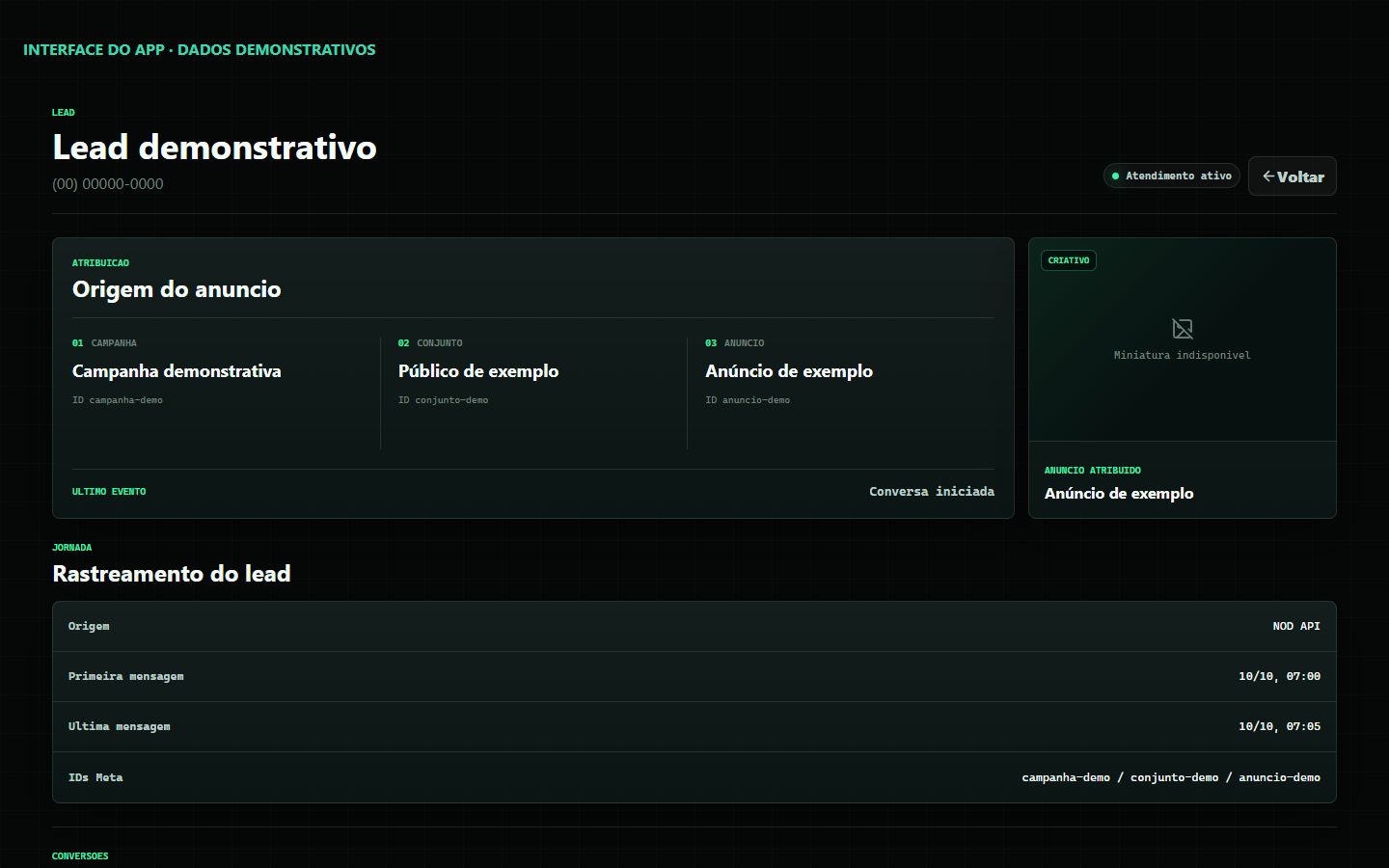
Tela demonstrativa de detalhe de lead no RastrackDash WhatsApp, com origem de campanha, conjunto e anúncio; todos os dados são fictícios.
2. RastrackDash Info: When the journey goes through the site
Not all contact starts in a conversation. Someone can arrive by campaign, visit the site, trigger an event, turn lead and buy later. The RastrackDash Info puts campaigns, events, leads and sales in the context of this journey, with a portal to accompany it. The problem he tries to solve is the distance between a click-through report and the final record of the sale.
Think of a person who clicked today, filled out the form tomorrow and bought it later. Before crediting the sale to a campaign, I would check which steps actually have record: visit, event, lead and transaction. If the origin was lost, the panel should leave the gap visible instead of inventing an assignment.
The interface is real, with demonstrative data in the presentation pieces. The numbers explain the reading, do not prove accuracy of assignment or performance. Info is the branch of the journey that goes through the site; the RastrackDash WhatsApp part of the conversation. See the article of the RastrackDash Info.
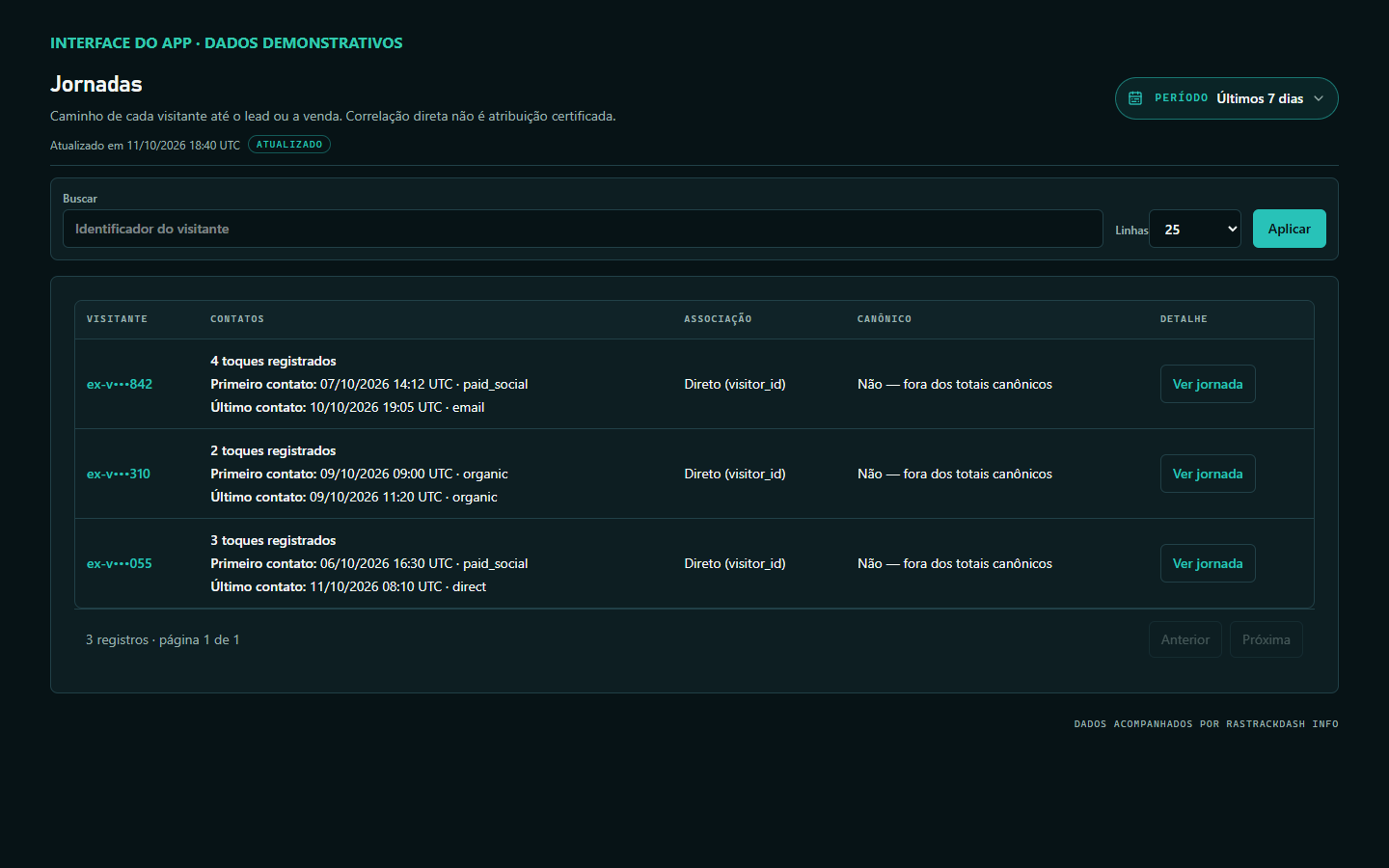
Lista demonstrativa de jornadas no RastrackDash Info com visitantes, eventos, toques, leads e pedidos fictícios; nenhuma informação de cliente.
3. RastrackIA: what to measure before installing a script?
A script copied from another page can generate events and still measure the wrong thing. RastrackIA is part of the structure of the page: analysis, selection of modules, script generation and installation guidelines. Technical review is part of the flow, because an automatic inspection does not know all the rules of the operation.
On a page with a form, button for WhatsApp and external checkout, I would start by asking what each action means. Click the button is not initiated conversation; form started is not submitted form; exit to checkout is not purchase. The app helps organize signals and modules, but someone needs to check the installed behavior and compare the events with real actions.
There's app interface with demo data. The project should not be presented as autonomous and complete implementation of GTM, Stape and all possible integrations. The practical limit is clear: generated script is not validated collection. Understand the process in the RastrackIA article.
Capture and service: turn entry into next step
4. Dynamic Forms: Does the form know why the person arrived?
Name and phone allow you to return the call, but they do not always say what to offer or who should answer. Dynamic Forms allows you to think of the form as journey of questions, answers and rules of qualification, with metrics and preparation of integrations. The useful question is the one that changes the next step; extra field without function only increases friction.
If a company serves virtual stores and businesses that sell by WhatsApp, can start by asking what the operation is. The following questions change according to the answer. Upon completion, the team receives context to start the conversation, instead of repeating the entire form through the chat. I would also look where people abandon the journey, to know if a question has gotten confusing or too long.
Is There App interface; the editorial capture of the builder uses demonstrative content. This look does not prove that all integrations are active in production or that a rule alone determines the quality of a lead. See how to draw the journey in Dynamic Forms.
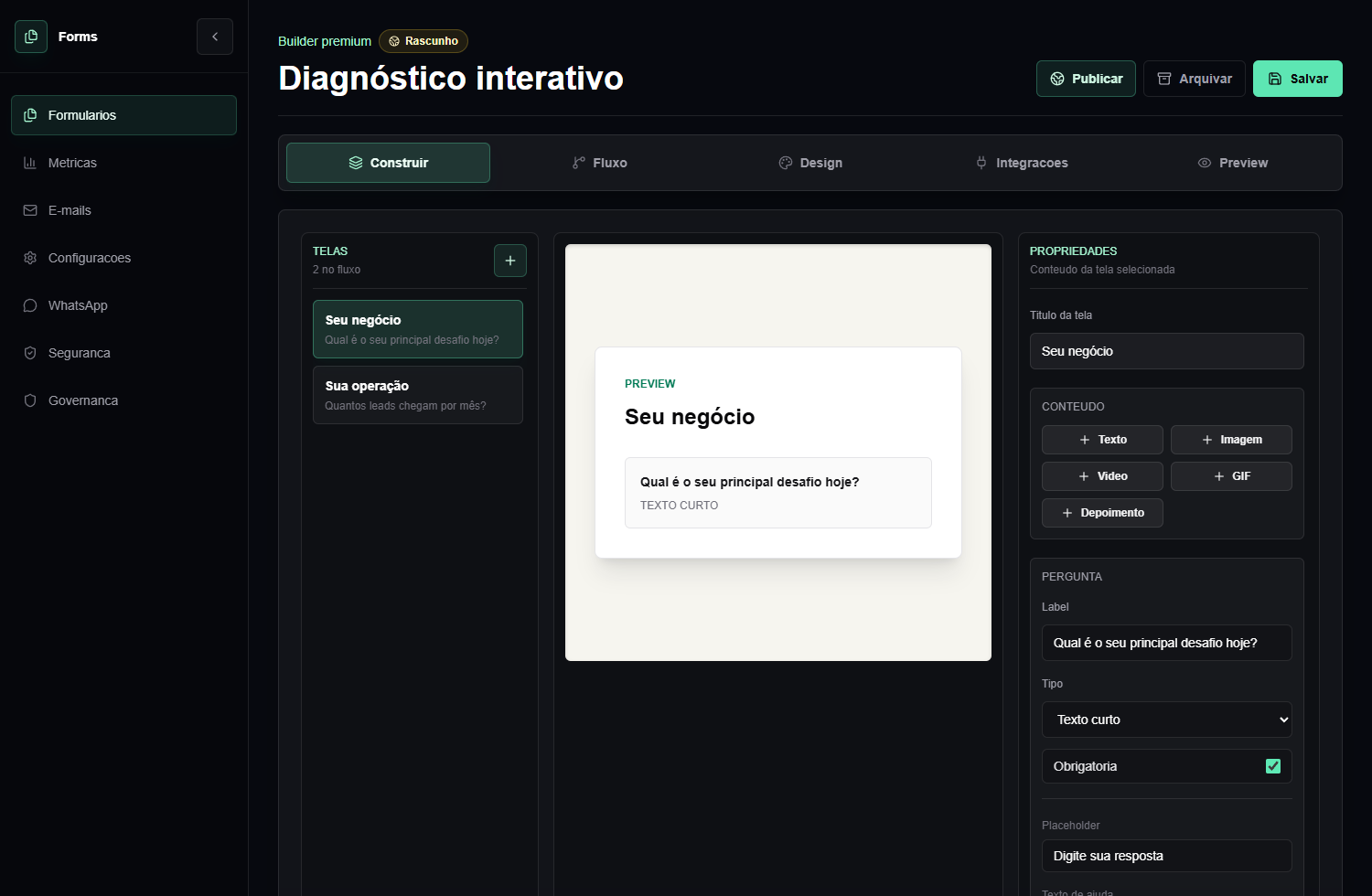
Builder dos Forms Dinâmicos com duas perguntas fictícias, propriedades de pergunta e prévia do formulário.
5. RastrackDash CRM: the concept for the Meta forms
The Meta instant form delivers the lead. Then someone needs to know who was responsible, when there was contact, at what stage he is and what to do next. It is for this interval between capture and follow-up that I imagined the RastrackDash CRM: gathering leads of instant, responsible forms, steps and history of movements.
In a team of three attendants, the same lead can be contacted twice while another goes unanswered. A record with owner, step and background would help solve this confusion. Before implementing, however, you still need to set permissions, entries, duplications, security, and the way the moves are logged.
Here the stage changes completely: o RastrackDash CRM it is only a planned concept. The application and the functional screen have not yet been implemented. Any conceptual visuals need to be identified as such. I wouldn't put it in a resource comparison available today. Read the problem and the concept of RastrackDash CRM.
6. RASTRACK App: who attends the lead which arrived by the WhatsApp?
Knowing which campaign the conversation came from doesn't solve the team's routine. The lead arrives, someone responds, someone else takes on, a task is pending. The RASTRACK App brings together chat, CRM, tasks and team vision to make this care readable. Here the focus is what the team does after the entry, not the main measurement of the origin.
Imagine an agency serving multiple clients. A contact calls for proposal today and needs return on Friday. If the conversation has stage in the CRM, task and responsible, the shift change is less dependent on the memory of those who answered first. The test is simple: someone else can open the history and continue without asking the lead tell it all over again?
There's real interface of CRM, shown with leads fictional in editorial capture. The chatbot is predicted as the evolution of the project; is not resource that I would describe as ready. See the RASTRACK App service flow.
7. Direct Service: what to do when the message comes from the Instagram?
On Direct, the message may also be stuck with those who saw it first. Direct Attendance seeks to gather inbox, history, notes, steps and next steps, with a prepared response for human review. The immediate goal is for a second person to be able to take up the conversation with context.
Think of a contact that calls for return tomorrow. The attendant opens the track record, registers a note and leaves a clear step for the team. Preparing a draft response is different from sending it. This difference is essential in the current state of the project.
Direct Attendance is pilot. The actual receipt has already been registered, but shipping to ordinary customers still depends on permission from Meta. The interface capture used in the documentation was done locally with fictional conversations; no response was sent in that demo. Therefore, it is not a response robot ready for any account. Read the actual stage of Direct Attendance.
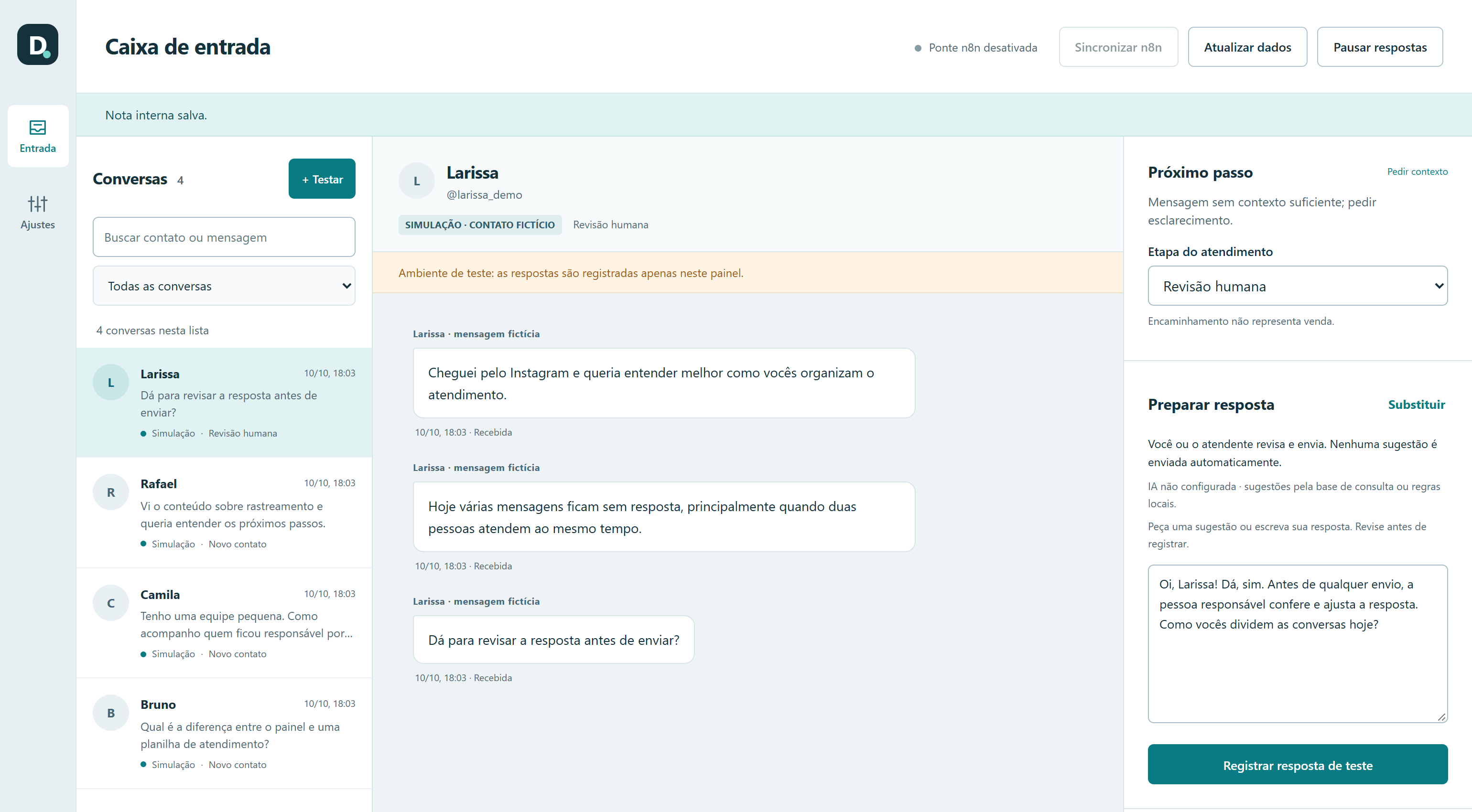
Inbox do Direct Atendimento em demonstração: conversas fictícias, histórico, etapa de revisão humana e rascunho não enviado.
After the lead: sale, agenda, groups and business vision
8. PalmUP Platform: Does the sale talk to the financial?
After the service, the operation usually spreads: the contact in a CRM, the offer in another system, the sale in a spreadsheet and the financial in another tab. A PalmUP Platform approaches contacts, products, offers, service, sales, financial and media data in a management vision.
Imagine a sale that needs to be checked. Which contact did you buy? What offer did you get? Has the payment been confirmed or is it pending? Was there a cancellation or refund? The route contact → offer → sale → financial It helps to ask these questions in the same analysis. It does not mean that every external system is integrated or that every exception is already resolved.
The available editorial screen is a faithful reconstruction of the components and styles of the project, filled with fictitious data. It explains the structure, but it does not prove results or end-to-end operation in production. Here’s how to think about this vision in the PalmUP Platform.
9. Agenda: the person wants to move forward; is there a possible schedule?
When the conversation becomes an invitation to a meeting, the team can spend multiple messages reconciling schedules. The Agenda works with public scheduling link, team availability and Google Calendar/Meet in the proposed flow. Good experience depends on showing schedules that the person in charge can actually meet.
In a diagnostic appointment, the person opens the link, chooses date and time, and receives details of the meeting. I would test the journey by mobile phone and check the side of the team: spindle, duration, responsible, event on the calendar, rescheduling and cancellation. A beautiful schedule page is not enough if the appointment does not appear correctly for those who will attend.
There's App interface, illustrated with event and fictional schedules. Public capture does not prove a completed reserve or validated backend from end to end. Reminders via WAHA are not validated and should not come in as a promise of operation. See the practical conference in the Agenda article.
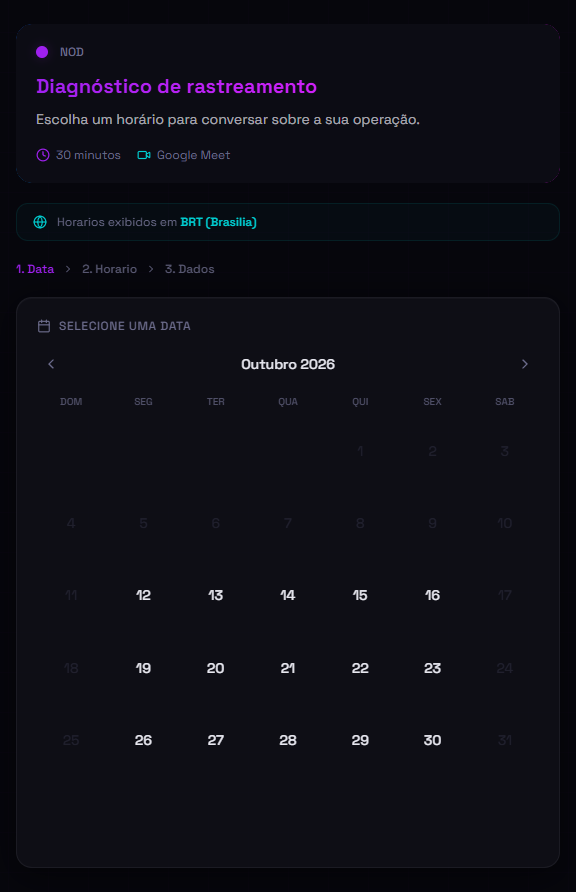
Página pública demonstrativa da Agenda para marcar diagnóstico, com evento fictício de 30 minutos e fuso de Brasília.
10. WhatsGroups: how many groups does your team follow without losing control?
For some operations, the conversation continues in groups. The work involves knowing which number is connected to each group, what message will be sent, to whom and with which result. WhatsGroups organizes instances, groups, models, submissions and monitoring to make this map less dependent on tabs and spreadsheets.
Imagine different classes in a launch. A meeting notice goes to certain groups; a welcome message goes to others. Before extending a submission, I would check instance, destinations, and model with a controlled test. Model saved is not message received; registered group does not prove that the sending occurred.
Is There app interface with demo groups in editorial capture. A new visual builder was discussed in the project, but Its execution still needs validation. Therefore, this guide describes the current organization, without promising automation not yet proven. Read the WhatsGroups routine.
11. RastrackDash Launch: See the fronts in the same context
In a launch, media, capture, conversations and sales usually have separate reports. The RastrackDash Launch was thought to put Meta Ads, Google Ads, funnel, WhatsApp, research and sales in a business reading. The question is not just “how many leads entered?" but at what stage has the path advanced or stopped?
If a campaign generated many registrations and few conversations, it is worth investigating the passage of the capture to the service. If there was talk and few sales, the investigation changes. A panel can point where to look; it does not replace the conference of the origin of the data, the covered dates and the rule that binds lead and sell.
There's Project Interface, but the demo numbers are fictional. They do not prove valid billing or integration across all accounts. Here’s how to read the launch without confusing chart with proof.
Production and coordination: when the operation remains out of the funnel
12. Dark Studio Channel: how to resume a production without restarting research?
Producing content for multiple channels creates another chain: library, production, queue, checkpoints, and calendar. The Dark Studio Channel seeks to make visible what material there is, what stage it is and what is left to do. The utility is in resuming a job the following week without relying on memory or a long search for files.
Imagine three videos at different stages. One has script; another has been rendered; the third awaits review. If everyone appears only as “in progress,” someone might skip a check or try to publish the wrong file. Library and checkpoints help separate prepared, pending, and completed material within the local process.
The Studio has Current Local Interface. The counts seen in it are Historic Workplace, no posts confirmed on platforms, views or revenue. A publication needs evidence in the destination. See the flow of the Dark Studio Channel.
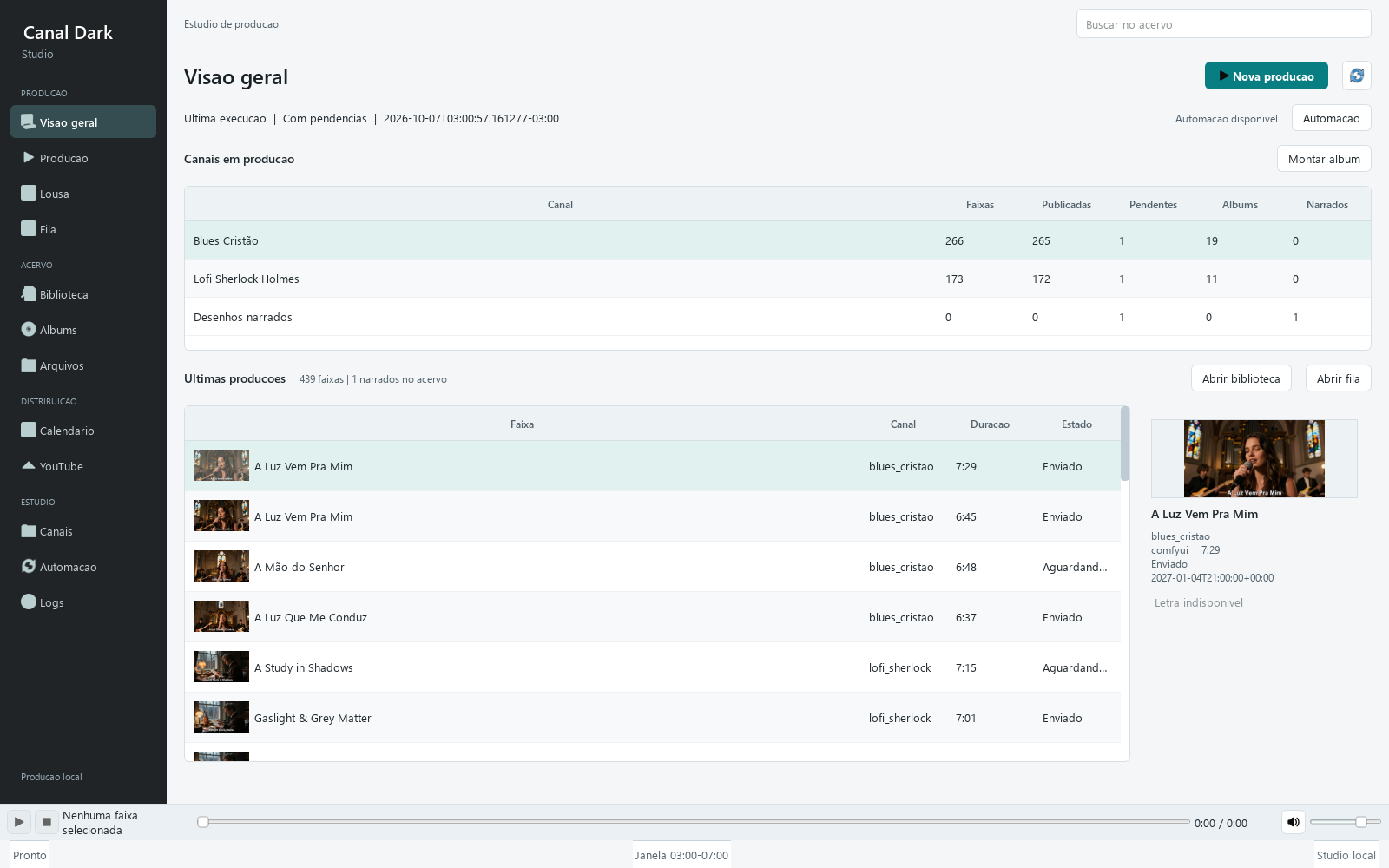
Interface local do Canal Dark Studio com biblioteca, fila e histórico local; não comprova publicação no YouTube.
13. NODTeam: who coordinates several agents and approves the delivery?
With multiple agents working in parallel, gaining speed is the easy part to see. The hard part is knowing who is doing what, with what context, what was left pending and who reviews before concluding. NODTeam is the design of a HQ for squads, agents, tasks, context and items awaiting human review.
Think about the production of this series: one front consults the sources, another checks what already exists, another writes and someone gathers everything. If the passages are not visible, an agent conclusion can be taken as editorial approval without review. The value of the project lies in the clarity of these transitions and the separation between “executed” and “approved.”
NODTeam is in development. The KPIs and states displayed in the demo interface are fixed values and do not prove agents in actual production, productivity or costs. Read the concept of coordination of NODTeam.
Which project to look at first?
The answer depends on the question your team today cannot answer. Some names seem close, but act at different times:
- Where did the conversation come from in the WhatsApp and as far as the lead advanced? RastrackDash WhatsApp: Reads origin and route; does not replace the management of the attendant.
- Who answered, which step is open and which task was left pending? RASTRACK App: Organizes the team routine after the contact has entered.
- What part of the journey through the site has reached the lead or for sale? RastrackDash Info: Part of the campaign records, website, events, leads and sales.
- What does the page need to collect before sending data to platforms? RastrackIA: Helps structure the script; requires review and test installed.
- Which form helps to qualify and which lead does Meta need follow-up? Dynamic Forms / RastrackDash CRM: The first has constructor interface; the second is still concept.
- What happened to offer, sale and financial? PalmUP Platform: Management view; the editorial screen uses fictional data.
- Where did the front of a launch stop? RastrackDash Release: Joins media readings, funnel, WhatsApp, research and sales.
- What piece of content or agent task needs review? Channel Dark Studio / NODTeam: Studio has local history; NODTeam is still in development.
Two different problems in the WhatsApp
How would I think of the joint use, without assuming integration
There are combinations that make sense as operation drawing. They don’t mean that projects already automatically exchange data. If I wanted to follow a campaign that leads to the WhatsApp, would begin by defining how the origin of the conversation will be recorded in the RastrackDash WhatsApp. Then I would separate the work of the attendant in the RASTRACK App: who answered, which step opened and which task was pending. If the conversation leads to a meeting, the Schedule can organize the schedule. If it becomes sale, the management of the PalmUP Platform can be the place to check out offer and financial. Each passage would require identifiers, permissions, process and own tests.
In a journey that begins on the site, I would start from the collection question with RastrackIA, observe the capture with Dynamic Forms when a form of its own makes sense and would use the campaign reading, event, lead and sale of the RastrackDash Info. The RastrackDash Launch can offer a broader view when there are multiple media and operation fronts. Again: that's one script to draw and check the passages, not a ready-made integration description between all of these apps.
In content production, Canal Dark Studio and NODTeam deal with different work. One organizes library, queue and calendar of materials; the other proposes coordination of agents, tasks and approvals. I do not need to affirm a technical connection between them to learn from the two ideas: material generated still needs revision; task performed still needs approval; publication needs receipt in the final channel.
Before combining any tool, I would ask four questions: which data is born here, who is responsible for it, how the next stage recognizes it and what evidence confirms that the passage worked? If a response is lacking, I mark the gap. It is more useful to have a smaller and reliable process than a map full of arrows that no one can verify.
The individual articles in this series deepen each project. Start with the bottleneck that costs you the most time or decision in your operation. The tool comes after the right question.