
Agenda: of the interest of the lead to a time that the team can meet
A scheduling link only helps when it respects availability, spindle and responsible. See the Agenda proposal and what to check between choosing time and confirming meeting.

The lead demonstrates interest and the conversation becomes an exchange of messages: “Can tomorrow?”, “Only after the 15h,” “At that time I can’t.” This seems like a small detail until the team needs to repeat the negotiation of schedules dozens of times. The Agenda was designed to turn this passage into a next clear step, with public scheduling link, team availability and Google Calendar/Meet in the project flow.
The goal is not just to put dates on a page. It is to make the person choose a schedule that the person in charge can really meet and that both know what has been combined. If the visitor sees a beautiful agenda, but the appointment does not reach the right person, the tool just hid the confusion.
An attendance that needs to become a meeting
Imagine that a person asked for the WhatsApp how to improve the reading of campaigns. The team responded to the initial questions and decided to mark a diagnosis. Instead of proposing schedules one by one in the conversation, it sends a specific link. The person opens on the mobile phone, reads the type and duration of the meeting, chooses a date and sees the available times.
This is the ideal way to explain the project. But after the click, there are operational questions. Does availability correspond to the person who will lead the diagnosis? Does the duration give enough time? Is the spindle displayed to the visitor the same as the team will use? Does the invitation have a context for anyone to arrive at the meeting without knowing the matter?
If one of these answers fails, the visitor may believe that they have scored while the team does not find the commitment. Therefore, I would test the complete journey with two people: one plays the role of visitor and the other confers the side of the operation.
Before you trust the scheduling
The checklist is not a list of features already proven in any environment. That's what I'd check to know if setting up the Agenda really helps the operation.
What prints show — and where do they stop
Cured captures come from the public interface of the locally executed app. The first shows the page of a Fictitious event. The second shows the time choice step after selecting a date, with Nine fictional schedules provided by response of API intercepted in the browser. They demonstrate the interface and visual passage from date to time. They do not demonstrate real availability, completed booking, authentication, or end-to-end validated backend.
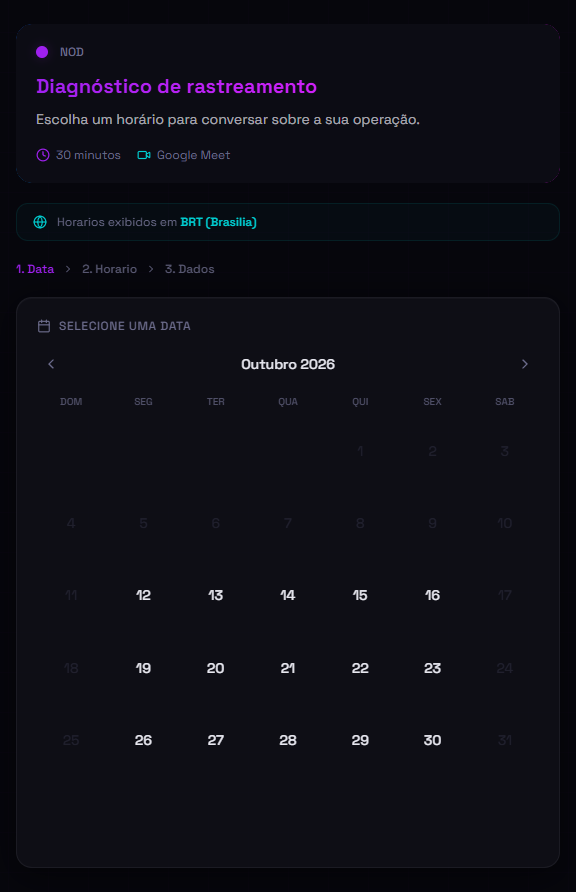
Página pública demonstrativa da Agenda para marcar diagnóstico, com evento fictício de 30 minutos e fuso de Brasília.
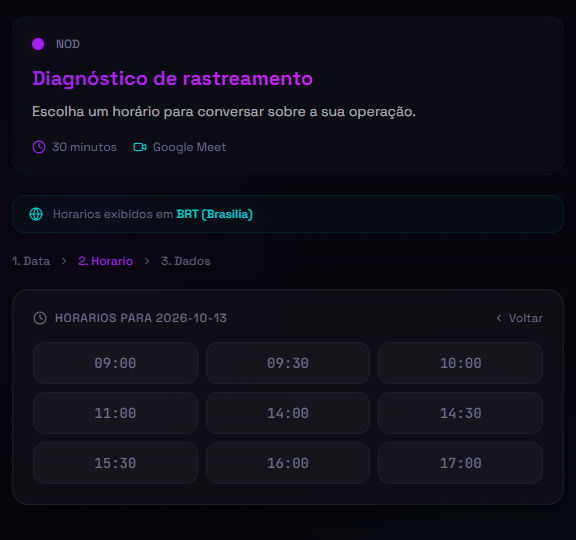
Etapa de escolha de horário na Agenda, com horários fictícios em BRT para um diagnóstico demonstrativo; reserva ainda não concluída.
This visual reading is important because a time drawn on the screen can be interpreted as a synchronized calendar and ready for anyone. The capture, by itself, does not say whether the invitation was saved, whether the team received the event or whether the Meet was created in the real environment. Each step needs its own test.
What would I not put in the promise
Reminders via WAHA appear as possibility discussed in the project, but They are not validated. I would not count on them to ensure presence or write that the Agenda automatically sends reminders. I would also not treat the link as a substitute for the service: some people need to take a question before choosing a schedule. If the meeting enters the journey too soon, the friction only changes places.
The Agenda talks to the problem dealt with in the RASTRACK App: the team needs to know the next step of a lead which arrived by the WhatsApp. If this step is a meeting, the link can arrange the choice of time. That It does not prove technical integration between the two applications.
How would I test with the team
First, it would create a test event with clear duration, responsible and description. The visiting person would open the link on the mobile and choose a date. The team would follow what appears in the calendar and the history of the environment used. Then, you would repeat the test with a time near the start or end of the workday to check the spindle and availability limits.
Then I would try to reschedule and cancel. It is not enough to confirm that the first click works; the real world has plan changes. It would also observe what happens if two people try to choose the same time. If the process does not avoid or explain this conflict, the team needs a manual rule until it corrects the flow.
Final checklist for the operation:
- Does the visitor understand what type of meeting is marking and how long it lasts?
- Were the person responsible and the availability checked in the correct calendar?
- Does the event and meeting link, where applicable, appear to both parties?
- Have the spindle, rescheduling and cancellation been tested?
- Does the team know what to do if the appointment fails or if the schedule changes?
When these questions have an answer, the link reduces messages and gives security to move forward. When they don’t, the first improvement is to fix the journey, not add more automations.
The agenda is one of 13 apps and projects of the general guide, which separates what each interface shows from a really validated operation.
Frequently asked questions before sending the link
Are the timings of the prints real availability of the team?
No. No. The event page uses a fictional case and the nine times of the second capture were provided by a demonstrative response in the browser. The screens show how the person travels through the choice of date and time. They do not prove that a real calendar was free or that a reservation was completed.
How do you see if the meeting is really scheduled?
Make a test schedule with two people and check out both sides: confirmation to the visitor, event in the responsible calendar, time and spindle, description and meeting link when applicable. Then try to reschedule and cancel. If any of these steps are missing, the team needs to know how to fix manually before relying on the link in the operation.
The Agenda already sends reminders by the WhatsApp?
I don't treat that as a validated function. Reminders via WAHA were discussed as possibility, but need implementation and testing of their own. The next step is to validate the basic marking first — availability, booking and confirmation — and then evaluate whether a reminder solves a real team problem.