
Dynamic Forms: A form that helps you qualify, not only capture
See how to draw questions, paths and results in Dynamic Forms, test the visitor experience and deliver useful context to the service.

“Name, phone and send” receives the contact. But does it help the team understand what to do with it? If the first conversation still needs to find out the sales channel, the problem and who decides, the form transferred all the work to the attendant.
Dynamic Forms allows you to build a journey on screens, adjust questions and prepare answer paths. The reference screen shows a builder with the modes Build, Flow, Design, Integrations and Preview. It also shows a form called “Interactive diagnosis”, still in draft, with two example screens. This proves the interface used in the demo; it does not prove that an external integration has already been activated for a client.
Draw the decision before the question
Imagine a team that serves two types of operation: stores with checkout on the website and businesses that sell in conversation by the WhatsApp. I would start by defining what changes in attendance. If the person sells through the site, the team needs to know the platform and at what point the purchase is confirmed. Sells by the WhatsApp, need to understand volume of conversations and who does the attendance.
A flow fictional, thought to illustrate the use of the builder, could be:
- Screen 1 How do you sell today? Options: “site with checkout”, “conversation no WhatsApp“or “both.”
- Screen 2A — For those who chose website: “On which platform does the purchase end?” The answer prepares a conversation about buying and conciliation event.
- Screen 2B — For those who chose WhatsApp: “Who answers when a person calls?” The answer prepares a conversation about assignment and follow-up.
- Result: present a message consistent with the path followed and deliver the responses to the service.
The rule is simple: If the answer doesn’t change the next step, the question probably doesn’t have to be there. It would not put “what is the billing?” just because the field fits on the screen. Before, I would explain why this information is needed and who will have access to it.
From response to next action
The above drawing is an editorial example. The reference capture does not show these three configured paths nor does it demonstrate sending to WhatsApp or CRM.
What the builder makes visible
In the product image, the left column lists two screens: “Your business” and “Your operation”. The center displays a preview of the selected screen, and the right column gathers properties such as title, content, question label, type “Short text”, obligation and placeholder. There are controls to save, publish and archive. This arrangement matters because it allows you to check what the person will see while editing the question.
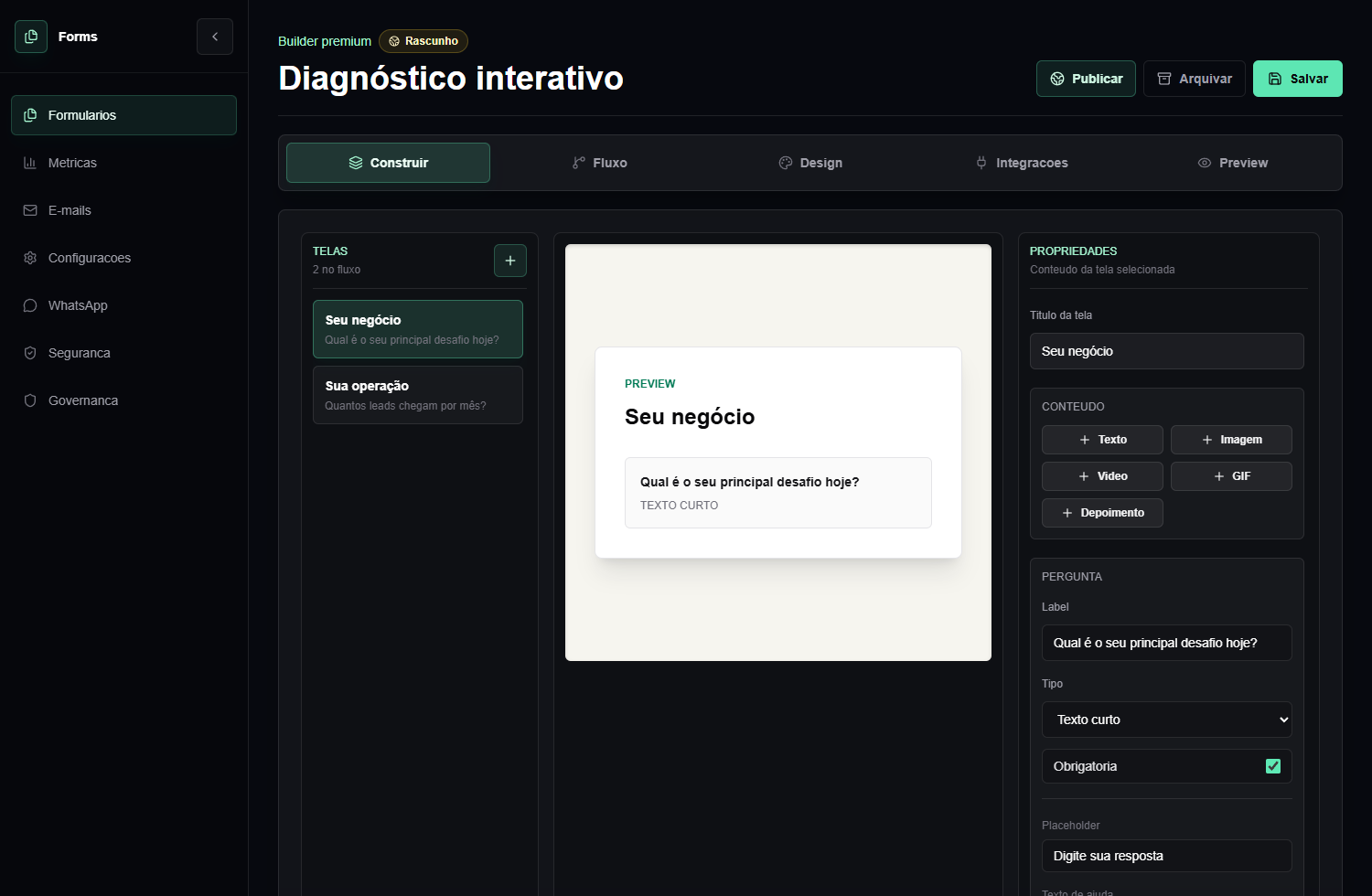
Builder dos Forms Dinâmicos com duas perguntas fictícias, propriedades de pergunta e prévia do formulário.
The design specification describes conditional logic, score, tags, and custom results as part of the builder’s evolution. What a specific capture proof is the construction of screens and questions. Therefore, I would validate each path in the Preview and in the public form before stating that a conditional branch, a score, or an integration is working in that facility.
The same goes for the tab Integrations. It indicates where the subject is set up, but the presence of a tab does not prove that a webhook has been received, that a message has gone out through the WhatsApp or that the lead appeared in the CRM. The proof is in the record of the destination and in the comparison with the saved answer.
A full test before publishing
I would go through the form as three test visitors: one that sells on the site, another by the WhatsApp and a third party who interrupts the journey in the middle. I'd do it on my phone and on my computer.
- The question and options fit on the screen without requiring zooming or confusing scrolling?
- Does the answer lead to the expected path and does the back button preserve the context?
- Does the end result match the answers given, without labeling the person unjustifiedly?
- Do the answers come complete and readable to those who attend?
- Is there consent, proper notice and only the data necessary for the stated purpose?
- If there is integration configured, has the destination received a single record and the delivery error is visible?
- What screen do people give up on, and does this question really help the decision?
Completion rate, step-by-step abandonment and response time can point to where to investigate. They do not prove the cause alone: a question can be confusing, long, invasive or simply have no relation to the expectation created by the announcement. I would look at the concrete question before changing the color of the button.
Dynamic Forms have value when it reduces the distance between capturing a contact and starting a conversation with context. The form does not replace human judgment on the lead. He must deliver verifiable information for the right person to take the next step. No map of 13 projects I created with Claude Code and Codex, he occupies precisely this passage between capture and attendance.
Frequently Asked Questions
How many questions does a qualification form need to have?
Those needed to decide the next step, with as little effort as possible for the person. I would start with sale channel and main problem, test the conclusion and only add a field if the answer changes service or referral.
A tab of Integrations ensures that the lead arrived at the CRM?
No. No. The configuration needs to be tested with an example response. Compare the saved record in the form with what you arrived at the destination and check for visible duplicates or failures.
What to check on mobile?
Readability, touch area, field-driven keyboard, navigation between screens, and clarity of the back button. Make at least a complete path and abandonment; the builder preview does not replace the test in the public form.