
RastrackDash Info: which campaign brought the sale that went through the site?
A guide to reading campaign, visit, event, lead and request no RastrackDash Info, distinguishing proven association of unknown origin.

A sale appears at checkout. The ad manager claims result. The team's worksheet shows a lead with the same email. That still doesn't tell the full story. Between the first click and the request there may be another visit, a conversation, a different device, or a step without registration.
The RastrackDash Info was designed to organize this investigation in an installation of its own: first-party collection, campaign data, events, leads, checkouts and a vision of the journey. The focus of this article is to read the path that passes through the site. No RastrackDash WhatsApp, the question part of the conversation; here, the visit and the events of the site are central pieces.
One request, two possible stories
Imagine a course page that gets ad traffic and organic search. The example is fictional. Ana clicks on an ad, visits the page, leaves the contact and buys two days later. Bruno arrives directly at the site, fills out the same form and purchases at the same checkout. The value of the sale may be identical; the evidence of origin, no.
- Ana: first visit with identified media origin, lead associated with the journey and request checked at the checkout. The campaign linked to the course deserves research.
- Bruno: direct access, no known campaign, lead associated with the visit and request granted. The sale must be counted, but the origin of media remains unknown.
A purchase without a known campaign remains a sale. It should not disappear from the business or be pushed into the last visible campaign just to complete a chart.
The path that needs evidence
Visit
Which URL, origin and timing were recorded?
Event
What did the person actually do on the site?
Lead
Is there a reliable consent and link to the visit?
Request
Did the checkout confirm the purchase and its identifier?
Attribution
Is the link with media direct, uncertain, or absent?
What appears in the interface
The demonstrative capture of the list of Journeys shows how the panel separates visitors, events, media touches, leads and requests in a first screening. The menu also gives access to Campaigns, Creatives, Events, Leads and Sales. When opening a specific journey, it is necessary to check the form of association, the first and last contact, the identities resolved and the timeline. It's this chain that I would examine before commenting on ROAS.
The panel itself distinguishes stronger associations from gaps. In the visual sample, there are indications of association by visitor identifier and labels that leave the origin of the media unavailable when it was not determined. The catch is marked “App Interface · Demonstrative Data”; your visitors, schedules and requests are fictional, not customer results.
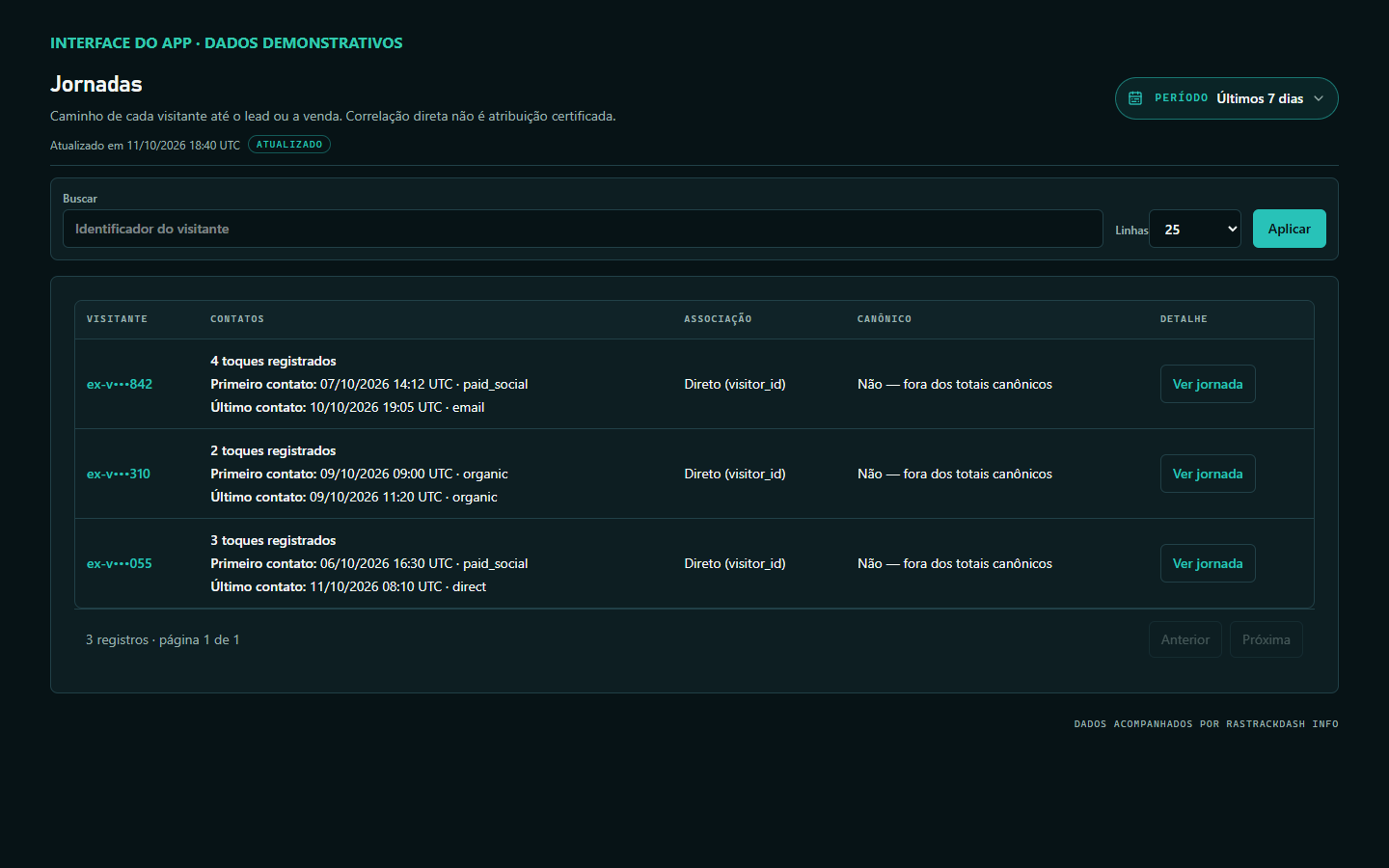
Lista demonstrativa de jornadas no RastrackDash Info com visitantes, eventos, toques, leads e pedidos fictícios; nenhuma informação de cliente.
There is also a Campaign screen with period selection and comparison of assignment criteria. I wouldn't start with her. First I would check a specific journey and confront the request with the commercial source; only then would it return to the aggregate. An aggregate number may mix visits, leads and requests that do not have the same quality of bond.
Product documentation describes collection of separate events and identification, checkouts such as ingestion edge, and a visitor resolution layer. It also registers an important limit: MVP does not send conversions to traffic platforms. In this flow, the RastrackDash Info is helping to build knowledge on its own. This reading should not be confused with an event already returned to Meta or Google.
How would I check out a sale
- I would choose a request that exists at checkout and would annotate your identifier, time and value without copying personal data for editorial analysis.
- It would open the corresponding journey in the dashboard and compare the timeline: visit, media touch, form submission and order.
- I would check if the link between lead and visitor is direct, inferred or absent. If there is device exchange or loss of the identifier, it would mark the uncertainty.
- It would compare UTMs, ad identifier, and parameters that came to checkout. An empty parameter cannot become a known campaign afterwards.
- I would repeat the check with a request without media origin to test whether the panel preserves the “I don’t know.”
- Only then would I analyze the vision per campaign, with the same period and the same attribution rule.
This test protects a distinction that I teach: first-party data collection collects and stores data in its own database; conversion tracking informs this data to the traffic platform. The first-party data collection leaves the person smart. The conversion tracking leave the platform smart.
Info organizes the question. Confidence comes from the comparison with site and checkout records, the clear treatment of the gaps and the review of how the events arrived. To compare this project with the others in the series, read the map of 13 projects I created with Claude Code and Codex.
Frequently Asked Questions
Should a journey without known origin be excluded?
No. No. It may contain a visit, one lead and a real sale. What is missing is the proof of the campaign. I would keep the order in the commercial result and mark the assignment as unknown until there is better evidence.
Does the panel prove that Meta received the purchase?
Not in the MVP described here. Info gathers and relates data on its own basis; sending conversions to the traffic platform is another step and needs separate validation.
Where to start when total sales doesn’t close?
Start with a confirmed order at checkout. Compare ID, schedule, value, and visitor before looking at the aggregate chart. Record whether the bond was direct, inferred or absent. This sample shows whether the problem is in the intake, the association or only the assigned rule chosen.