
RastrackDash WhatsApp: from campaign to conversation, what happened to the lead?
Here’s how to compare Meta conversations with real contacts, follow the step of the lead and audit events sent to the platform in the RastrackDash WhatsApp.

The Meta report says a campaign brought talks. The team opens the WhatsApp and tells another story: some contacts do not appear, others have no clear origin, and no one knows how many have reached a useful stage. It is in this difference that the analysis begins, not on the promise of a perfect note or a beautiful panel.
The RastrackDash WhatsApp was made to approach campaign, conversation, lead and event in the same reading. The reference installation shows reports by campaign, list of leads tracked, detail of the origin and an audit of the events sent to the Meta. These screens help investigate the operation; no number displayed in a capture replaces the record conference of your own account.
One example: fewer conversations, more result
Imagine two campaigns running in the same week. The numbers below are fictional, just to show the decision I would seek to make.
- Campaign A: 80 identified conversations, 6 leads who have advanced and 1 purchase conferred.
- Campaign B: 35 identified conversations, 9 leads who have advanced and 3 purchases checked.
If I looked just for conversation, the A campaign would look better. By following the contacts until the stage of the lead and the purchase checked out of the panel, B deserves another attention. You can’t declare which ad won yet: we need to compare investment, analysis window, sales value and the quality of the assignment. The comparison shows why Message volume is not the end result.
On the screen of Performance by campaign, the reference facility puts investment, conversations recorded by Meta, actual conversations identified in the WhatsApp, leads qualified, purchases and revenue side by side. There are filters by period, account, campaign, set and ad. I would start by choosing the same interval in all sources and opening some lines that have a big difference between “Meta conversations” and “real conversations.”
From the media to the conference
This flow represents questions to be checked, not a guarantee that each company has already integrated all the steps.
What the screen of the lead clarifies
The list of Leads tracked by the WhatsApp allows you to search for a contact and filter situation and step. The detail of the lead was designed to show the announcement and the creative associated with the conversation. The demonstrative image below reproduces the actual interface with a single lead fictional, campaign, set and example announcement; phone, date and identifiers are also invented. It illustrates the source fields, not a customer outcome. I would use the screen like this:
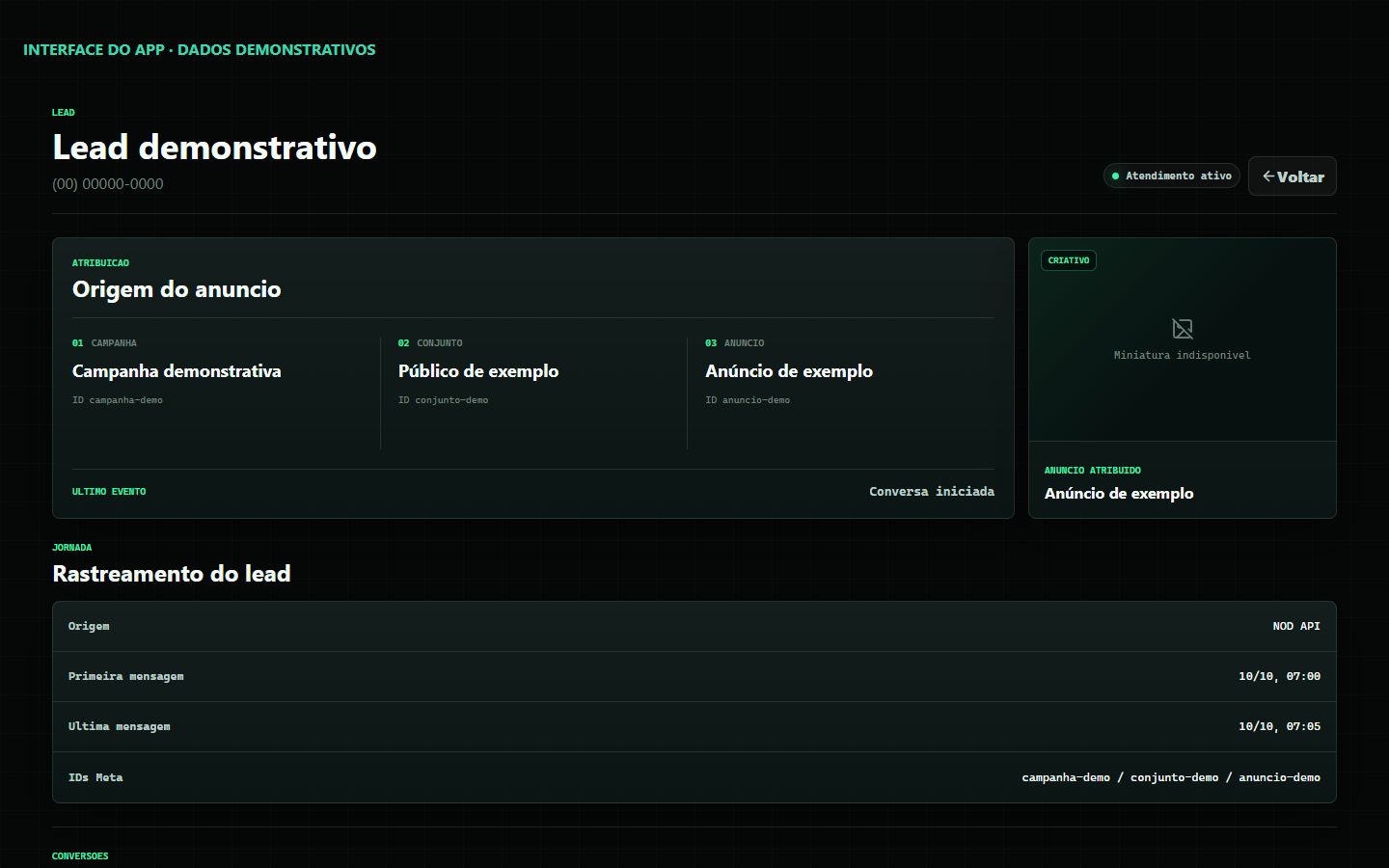
Tela demonstrativa de detalhe de lead no RastrackDash WhatsApp, com origem de campanha, conjunto e anúncio; todos os dados são fictícios.
- I would take a contact from a specific campaign and confirm that the conversation actually reached the expected channel.
- I would check if the recorded origin points to the right campaign and ad. Missing origin is information; filling the gap by guess only hides the problem.
- It would check if the step was updated by a real action of the attendance, and not just because the contact entered the list.
- It would open the sale record in the source system to validate the final event.
It is different from the RASTRACK App, which focuses on the routine of those who attend: chat, tasks, guardians and CRM. Here the central question is where the conversation came from and what happened next. The two problems can be found in the same client, but they are not the same tool.
Was the event sent or should it have only been?
The screen of Conversion audit separates states such as sent, in the queue, blocked and failures. There is also an audit period and event history. This distinction is useful: a purchase registered on its basis does not prove, by itself, that Meta received the event. A blocked event calls for configuration investigation; an event in queue still awaits processing; a failure requires looking at the cause before promising recovery.
The panel also provides for review of purchases and new submission of eligible events after the cause of the lock is fixed. This does not turn any event into valid conversion. Before resending, I would compare the identifier, time, origin and actual request to avoid duplication or information without ballast.
Here comes my editorial distinction: first-party data collection is to collect and store data in its own database; conversion tracking is to inform this data to the traffic platform. The first-party data collection leaves the person smart. The conversion tracking leave the platform smart. One may be working while the other fails.
Checklist for the first audit
- Set a closed campaign and period; use the same cutout in the manager, in the WhatsApp and on the panel.
- Compare Meta-accounted conversations with contacts identified in the operation, without expecting ever identical numbers.
- Open a sample of leads and check out campaign, announcement, first message and current step.
- Validate purchases from an independent source before analyzing revenue or ROAS.
- In the audit of events, separate sent, queue, lockdowns and failures; record the cause of each relevant exception.
- Only then decide if the adjustment is in the ad, in the collection, in the service or in the sending to the Meta.
Demonstrative captures show the product interface with fictitious data; are not promise of performance for another operation. The best use of RastrackDash is to turn every divergence into a verifiable question. To see where this project fits between data, attendance and operation, go back to the map of 13 projects I created with Claude Code and Codex.
Frequently Asked Questions
Why the Meta and the WhatsApp show different numbers?
They are counts made at different points of the journey. Attribution window, repeated click, contact that does not reach the channel, absence of identification and collection error can explain part of the difference. I would start by checking the same period and a sample of conversations before calling any number wrong.
If the purchase is on my basis, can I assume that the event was shipped?
No. No. The purchase needs to be validated at the commercial source and the shipment needs to be checked in the conversion audit. Queuing, blocking and failure have different causes; resending without correcting the cause can produce duplicity or a die without ballast.
When is it worth comparing campaigns by the number of conversations?
The volume helps investigate the input of the funnel, provided that the period clipping and conversation definition are the same. To decide where to invest, it is also necessary to look at cost, advancement of the leads, sales conferred and the quality of the association between campaign and contact.