
Dark Studio Channel: a content production that can resume
Library, player, queue, albums and calendar: See how the Dark Studio Channel helps resume the production of music channels without confusing local history with confirmed publication.

I created the Dark Studio Channel because the production of music channels does not end when a track is generated. It is still necessary to listen, choose the art, organize the material, decide the channel, follow the queue and know if the publication has been confirmed. When each step is in a different folder or annotation, resuming work costs almost as much as starting.
Studio is a native Windows application. The current interface has overview, library, production, queue, calendar, channels, albums, files, automation, logs, and a YouTube area. The player allows you to listen to a track without leaving the stream. The review capture came directly from the local interface; it shows history and art of the environment at that time, not statistics confirmed by YouTube.
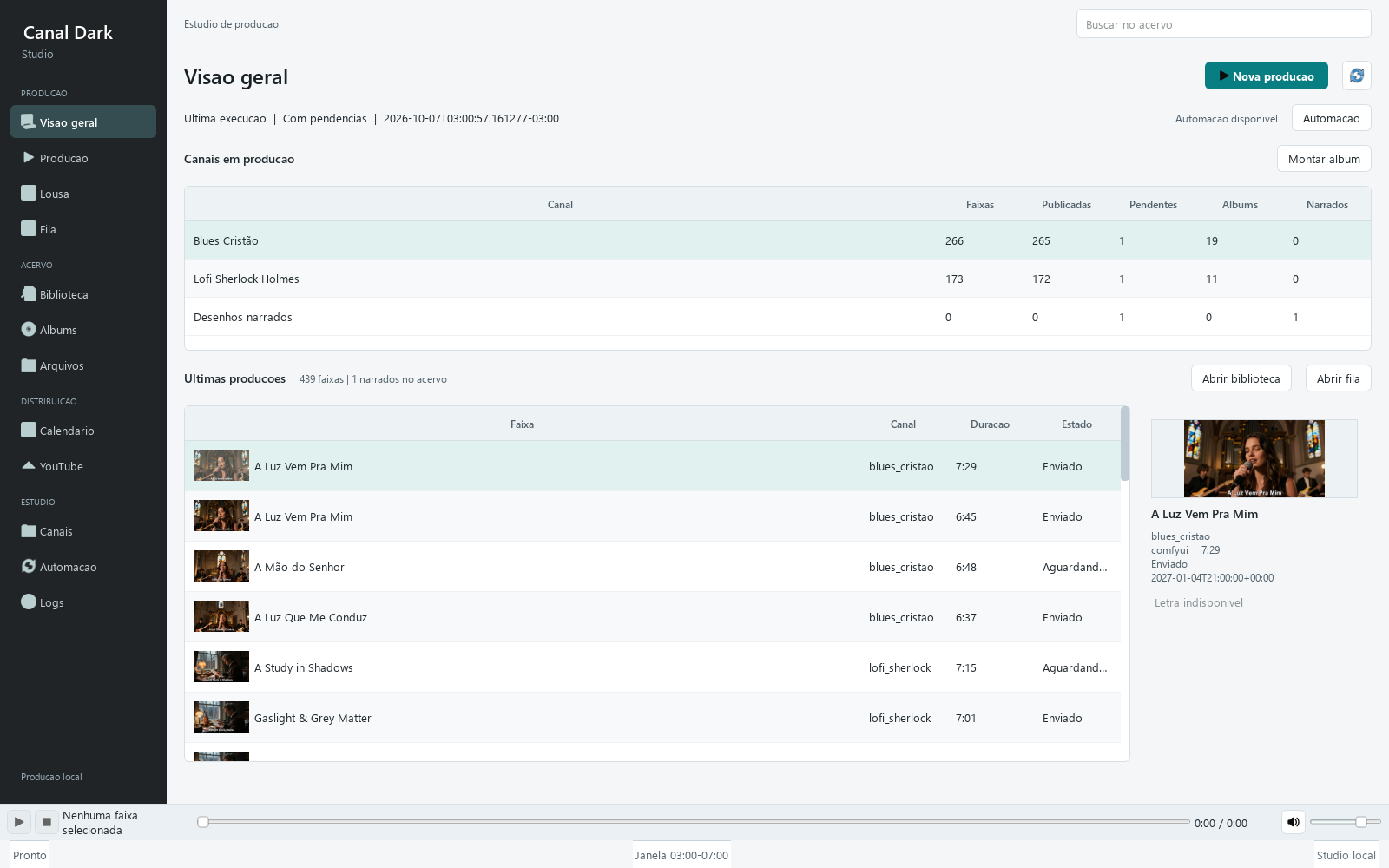
Interface local do Canal Dark Studio com biblioteca, fila e histórico local; não comprova publicação no YouTube.
The difference between having a file and having a delivery
Suppose a track has finished being generated, but art still needs revision. The file may be in the library and appear in a recent production, without being ready to enter the calendar. Another material may have been put in line, but still depends on a previous step. Separating these states makes the next step visible.
In the Studio overview, you can see channels, tracks, trends and recent productions. The queue and library have their own access, as do the calendar. I use this division to answer three questions before following: what is the right material, what stage did it stop and who needs to act now?
One track, several different states
Library
Locate audio, art and track materials.
Review
Listen and check out what still needs adjustment.
Queue
Record the next action without calling it a publication.
Calendar
Define the intention of when and where to publish.
Confirmation
Check the ID and state in the external destination.
What does “sent” mean inside the Studio
A state like “Sent” in the local history tells you what the app has logged. It is not, in itself, remote confirmation that the video is visible, that the right channel received it, or that the publication remained active. The project documentation separates local remote reconciliation history: the external conference is read-only and uses already stored IDs.
This care also applies to the calendar. A completed date does not equate to completed uploading. I wouldn't count a track as published just because it went into the schedule or because the dashboard incremented a countdown. To declare publication, I would look for the remote ID and check the state in the corresponding channel.
There is another operational part that I consider important: night production and publishing schedules are different things. Studio can organize batch jobs, but opening the interface doesn't change scheduled Windows tasks. This prevents a simple panel query from being confused with a change in automatic routine.
How would I resume a halted production
I would open the overview to locate the last production and the channel. Then I would check the track in the library, listen to the audio, check the artwork and consult the queue to see if there is a pending action. If the material is marked for publication, it would look at the calendar. If it is marked as sent, it would seek confirmation by the remote ID before recording the final result.
The usefulness of the Dark Studio Channel is in this continuity. He organizes local evidence so that a person can resume work without guessing where he left off. Application capture can show this organization; it should not be used as evidence of audience, revenue, or publications that have not been verified outside of it.
How to read the overview capture
The print starts with the indication “Last execution | With pending”. The top table groups channels and features track columns, published, pending, albums, and narrated. Below are the latest productions, with title, channel, duration and a local state. On the right, a selected track opens its art and details; at the base of the window, the player allows you to listen to it. This arrangement helps to exit an abstract list and find the file that calls for attention.
The track numbers and the “Sent” label belong to the local history shown in the capture. I wouldn't use them as a verified count of public videos. One line may have audio and art ready, but still lack confirmation of the platform; another may be marked as pending by a previous step. The overview is a starting point for investigating production, not a YouTube receipt.
The menu separates Production, Sludge, Queue, Library, Albums, Archives, Calendar, YouTube, Channels, Automation and Logs. The presence of these areas makes navigation visible, but does not mean that each integration is validated at the time of capture. For the reader, the most useful lesson is to observe the passage between them: the material is born in production, it needs to be found in the library, it can depend on a queue and only then it must be reconciled with the external destination.
Example: the track is ready, but the video did not appear
I would start with the track name and the channel displayed in the overview, without relying only on the aggregate counter. It would open the item to listen to the audio and see the correct art. Then you would look up the queue and logs to locate the last completed step and any error. If the calendar shows a future date, this explains why I still don’t expect public visibility; if the local state says “Sent,” I would look for the stored remote ID to check the video on the right channel.
If there is no remote ID, the path is to record this absence and investigate the upload. Manually marking an item as completed can clear a visual pendency, but it does not create the missing video. It would also not automatically repeat the upload before checking the destination, because a previous attempt may have worked and left the local history incomplete. External checking avoids both false success and duplication.
The project documents a pipeline of generating lyrics, music, audio, image and video, as well as scheduling and uploading. This drawing explains why there are so many steps and why checkpoints make sense. The capture of the Studio, however, does not prove that a specific execution went through all of them without fail. For this kind of statement, I would need the logs and the result in the corresponding channel.
Resumption checklist
- Identify channel, track, and files that belong to the same production.
- Listen to the audio and check out the artwork before using the state displayed in the list.
- Look for the last completed step and the pending in the queue or in the logs.
- Differentiate planned date in the confirmed publication calendar.
- For “Sent” item, look for remote ID and effective status at the destination.
- Record the gap when there is no confirmation, without inventing a result.
Common doubts
“Sent” means the video is public? Not by itself. It is a state of the application that needs to be confronted with the channel and the remote ID.
Does opening Studio shoot the nightly routine? The opening of the interface does not change the scheduled tasks of Windows; production and publication time are different controls.
Can I use the track counter as an audience metric? No. No. It describes items from the local collection, not views or revenue.
This guide is part of the series 13 projects I created with Claude Code and Codex.