

Vertical Content Machine: How to Learn from Test Reels
Assemble a collection of hooks, bodies and CTAs, compare Test Reels at the same age and use the data to decide what to record. Includes spreadsheet template, example and prompt.

When a Reel goes well, what part can you repeat? The phrase that opened the video, the demonstration in the middle or the request you made at the end? If you only save the final file and total views, it is difficult to respond.
In my Vertical Content Machine, the idea is to store these three parts separately. You repurpose a body and a CTA you already have, change only the opening and test the difference. The spreadsheet links each version to Reel that actually came out. Then you read the results at the same age and use the comparison to decide the next video.
The path of the agenda to the next video
1. Set up a collection of the parts of the video
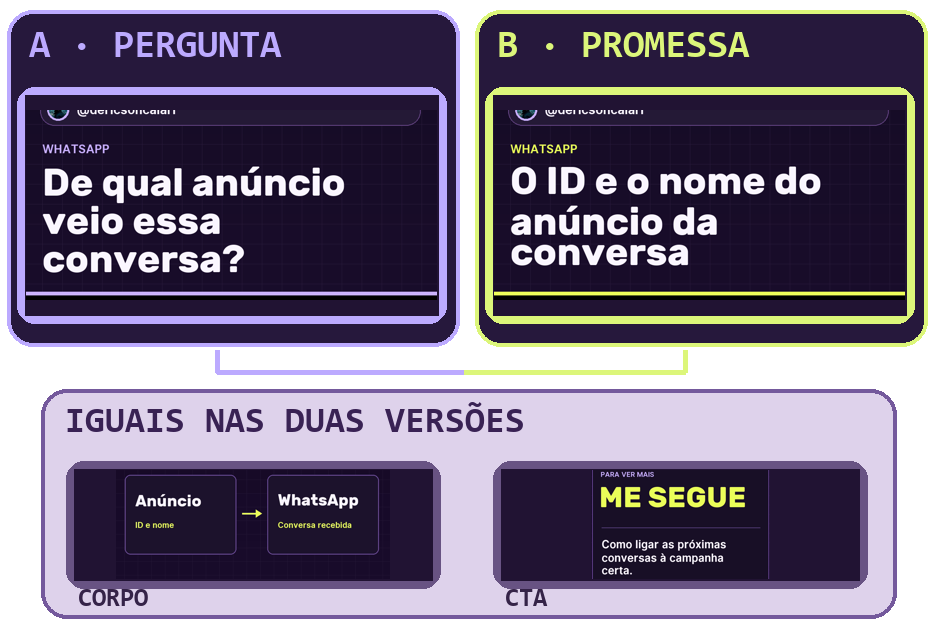
Duas aberturas de Reel com pergunta e promessa, mantendo corpo e CTA iguais
Hook It’s what you see and listen to right away. Save the literal speech, the first frame, and what happens in the first few seconds. Body is the delivery of the video. It can be a demonstration, a diagnosis or the story that underpins the openness. CTA is the final request, for example save, share or follow. Record the actual phrase and record the destination when there is a link or a keyword.
Start with two to four pieces that you have already produced. Open the final version and write down what went into the real video. If a content has brought many saves, also save the subject, the format, the scope and the age of the reading. So you have a reference for the next agenda. When there are historical numbers, compare them within the same account, format, type of distribution, and age. A boosted Reel, a public Reel and a Reel still in test can reach different audiences.
2. Separate the collection from what has already been published
Create four tabs in Google Sheets. Give short names to the pieces, such as G01, COR01 and CTA01. The internal ID identifies a piece of yours. The media ID of Instagram identify Reel on the platform. Format the IDs as text in the worksheet to preserve the digits.
Tab and unit | Initial fields | What to fill |
|---|---|---|
Collection · one line per module and version |
| Save speech, first frame or demo, file and version. Use states such as |
Experiments · one line per pair |
| Record what you want to change, what's fixed, and the rule to read the test before recording. |
Reels · one line per version |
| A and B have their own chips. Use |
Readings · a line by media, collection and source |
| Save the raw values and the reading as it was at that time. Write down spindle, original field and gaps. Mark the surface as |
In the Readings tab, create the column janela_alvo_h for the planned moment, such as 24 or 72, and idade_h for the time observed since publication. Store schedules with spindle, for example 2026-11-23T19:00:00-03:00. So you can check how many hours Reel had when collecting, even when the two versions leave on different days. Fix the version code of each module used, such as G01-v1, in Reel's references. If you re-record the sentence, save another module record.
See how the bond looks. In the experiment T01, Reel T01-A use G01-v1, COR01-v1 and CTA01-v1. The Reel T01-B use G02-v1 with the same body and the same CTA. The reading of 72 h of A points to T01-A. Thus, you can find out which hook produced the reading by going back from the metric to the video version and to the collection.
3. Bring the Instagram Insights into the spreadsheet
You can start with two copied readings of your own Instagram. When you are following multiple videos, use the connector Instagram Insights from Stract to pull content metrics to a raw tab in Google Sheets. Save a separate portrait to each collection. Update the query in the raw tab replaces the previous reading if you use the same cells. Connector Instagram Insights of the Stract
Instagram Insights · Google Sheets
Stract for Instagram Insights
Pull the available data from each Reel to Google Sheets and save the readings by age of the post.
- Consultation by content of the Instagram
- Media ID to locate Reel
- Extraction to a Google Sheets tab
Take the data to your spreadsheet
Use the connector Instagram Insights to fill in the raw data tab.
Hire the Strat(opens in a new tab)Affiliate link. I may earn a commission if you subscribe through this link.
- Install the Stract add-on and open the sidebar through the Google Sheets extension menu. Authorize an account that has access to the profile insights you want to analyze. Installing the Strat in Google Sheets
- Select Instagram Insights and the profile. Assemble a query by content, using the media ID, format and date of publication. Add range, shares, saves, media follow-ups, and average time when fields appear for that account and format. Check the label and unit of each field. Fields of Instagram Insights · Updates of the API of the Instagram
- Make a first extraction of few Reels for a tab
Bruto_IG. Compare two lines with the app: same media, same approximate time and same definition. Copy the validated result as values for the Readings tab, with the source and time. If a field comes blank, preserve the void. Use0when the source informs zero. - Check if each Reel published as a test appears and that there is a field that proves the test condition. The consulted public list of fields describes Reels and media metrics. The test condition and window of 24/72 hours need to be confirmed in their collection. In the first pair, use the receipt and native reading of the Instagram to record the state and complete the available fields. If the main metric is missing for a variant, keep the comparison pending.
4. Publish a pair of Test Reels
Choose a question that can be answered by changing something. Showing the error on the screen right off the bat increases the shares per thousand accounts achieved? In version A, open by saying “Look where the comparison of your Reels breaks.” In B, use the same speech and immediately show two rows of the spreadsheet with different ages. This duo tests the First picture. Keep body, CTA, duration, caption and settings as close as possible. Record the interval between versions and try to use similar schedules. If you also change sentence, editing, or proof, you will have tested the combination of these changes.
On the final Reel screen, make sure your account shows the option Test. Read the entire preview, review the caption, audio, cover and requested action. Post after the review. If the control is unavailable, record the limitation. You can plan a separate test on public Reels and collect both versions on that same surface. Meta describes the Test Reels as initially shown to people who do not yet follow the profile. Followers can find the video by other paths, such as a message from someone who received Reel. How Test Reels work, according to Meta
The Meta indicates that some numbers appear approximately 24 hours after sharing the Test Reel. You can choose automatic sharing with everyone based on the views of the first 72 hours. To observe A and B under the same conditions, turn off this option before publishing and decide manually after the last intended collection. Record date and time if you share with everyone. If a version passes before to the public, compare only the collections prior to the change that are of equivalent age. Test Reels Settings and Metrics
5. Compare the same age and the same denominator
One Portrait of the metric, or snapshot, is the cumulative amount you wrote down when Reel was a certain age. Set the collections before, for example 24 h and 72 h after each publication, with tolerance of two hours. Take the portraits whenever the source shows the numbers. If the first reading is only available to 31 h, register 31 h. An extraction made today of an old video records today's accumulated. To read the result of 24 h, you need a data pertaining to that moment.
That detail appeared when I reviewed a native export of mine Instagram with 285 pieces from January to 22 november of 2026. Of 19 Test Reels with publication confirmed on receipts, 18 they were in export. She brought the accumulated available on the day of the consultation. I used this material to raise hypotheses of agenda and left open the reference of performance of the tests to the 24 h and as 72 h.
Metric | How to Calculate | When to look |
|---|---|---|
Shares per thousand |
| When the question is whether the idea deserves to be sent to someone else. |
Rescues per thousand |
| When the expected value is to use the tip later. |
Follow-ups per thousand |
| When the idea is to draw someone to the next post. |
Relative average time |
| To compare video consumption of similar duration, if the source covers both. The measure describes relative average time. Completion rate requires a field of its own. |
Views are preview records and may include new playbacks. Reach describes accounts reached according to the source. For the first three lines, use the range and counting of the action on the same collection and on the same surface. If the denominator is absent or zeroed, leave the rate blank. In a group of Reels, calculate the rate grouped with the sum of the shares divided by the sum of the ranges of those pieces. This sum represents exposures by Reel and can count the same account in more than one piece.
What to do with the numbers
Imagine that you have defined Shares per thousand to 72 h, with an exploratory floor of 1.000 accounts reached by version. All the numbers below serve to show the account.
Variant | Portrait | Range | Shares | For a thousand |
|---|---|---|---|---|
A · camera in the first frame | 72 h, in test | 1.200 | 14 | 11,7 |
B · spreadsheet in the first frame | 72 h, in test | 1.100 | 22 | 20,0 |
The first picture of B is a signal to repeat the hypothesis. He had 8,3 more shares per thousand in the pair. The floor helps to avoid a decision on very few exhibitions. The public draw, the schedule, the interests of those who received the video and the distribution of the platform itself continue to influence the result. This pair is an exploratory editorial test. To increase confidence, repeat the change of the first picture in another similar agenda and alternate the order of publication. If it only passes the floor, write it down Insufficient sample and repeat the pair. If the initial question was about sharing, keep that decision even if likes or views point to another direction.
Copiable Prompt for your first round
Exchange the blocks between brackets for the spreadsheet data. If you’re starting out, leave history and empty readings and ask for the collection plan. Use only aggregate numbers and fields that you can share.
Atue como meu assistente editorial para Reels orgânicos. Meu objetivo é escolher o próximo teste a partir do que já gravei e dos dados observados na minha própria conta. Trabalhe em português do Brasil e explique em linguagem simples.

Conta, tema, público e ação que quero incentivar: [preencha]
Módulos disponíveis com ID, versão, fala ou ação, arquivo e estado: [cole as linhas do Acervo]
Reels anteriores com ID de mídia, módulos, duração, estado e datas com fuso: [cole as linhas ou deixe vazio]
Leituras com mídia, fonte, data e hora, idade, superfície, alcance, views, compartilhamentos, salvamentos, seguimentos e tempo médio quando disponível: [cole as linhas ou deixe vazio]
Minha janela principal, tolerância em horas, piso por versão e métrica principal: [preencha se já defini]
Limites de gravação e revisão: [preencha]

1. Confira a identificação dos módulos e dos vídeos. Diga quais são rascunhos, quais têm publicação confirmada e quais têm superfície ou horário desconhecido. Use vazio para informação ausente e zero apenas quando informado. Aponte diferenças de fonte, idade, unidade, distribuição ou definição de métrica.
2. Quando houver dois retratos comparáveis, calcule a métrica escolhida com seus números brutos. Para ações por mil, divida a ação pelo alcance e multiplique por 1.000. Exiba a conta, a diferença e os limites. Se faltar dado, houver denominador zero, mudança de distribuição ou piso insuficiente em uma variante, marque a leitura como inconclusiva e diga o que medir.
3. Proponha um par de versões A e B para a próxima pauta. Declare a pergunta, mude uma variável, indique os IDs de gancho, corpo e CTA e escreva a abertura literal, a entrega do corpo e o pedido final. Liste o que precisa ficar igual e o que é módulo novo. Se faltar histórico, proponha um primeiro plano simples para minha aprovação.
4. Entregue linhas para Experimentos, Reels e Leituras, com os campos ainda desconhecidos vazios. Sugira dois horários de coleta em relação à publicação de cada vídeo e um critério objetivo de leitura. Indique o que precisa ser conferido no Instagram e deixe a publicação e o compartilhamento com todos para minha revisão.
Open the Experiments tab and write a question that accepts a practical answer. Then record both versions. The first useful delivery of the machine is the pair you can measure and the next decision you can explain with the numbers you have collected.