
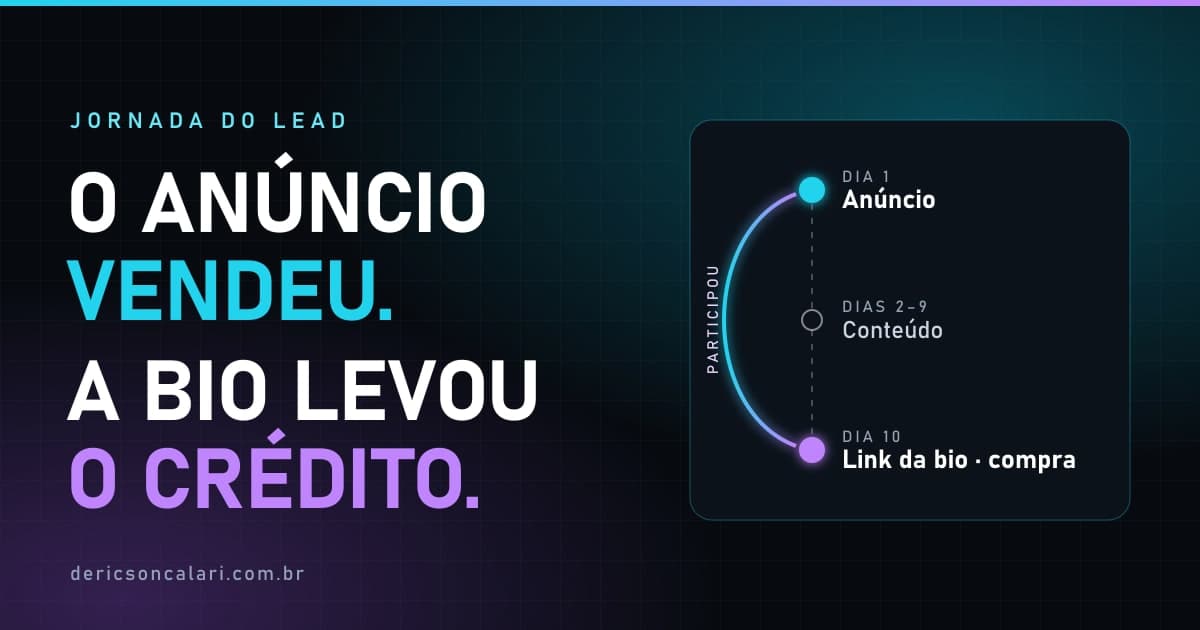
The link of the bio led to the sale that the announcement made: how to assemble the journey in your dashboard
He clicked on the ad, didn't buy it and came back days later by the bio link. Understand why Meta, the first click and the last click tell this sale in different ways and mount the journey in your dashboard, with prompt ready.

This is the material of the JOURNEY. You saw it in the video: the person clicks on the ad, enters the page, does not buy, spends a few days consuming its content and, on the tenth day, buys by the link of the bio. The announcement did the heavy lifting. The one who appears in the sale is the bio.
Here I show you Why does this happen and how to put together this journey vision on your own dashboard: what to capture, how to save, how to connect the purchase to the touches and how to display. In the middle has one prompt ready to paste into your AI and, in the end, the shortcut to those who want it working without riding from scratch.
Short answer
The ad manager only assigns the sale to the campaign if it happens within the configured attribution window. The UTM that arrives with the purchase counts only the last way. Neither of them are wrong; they answer different questions.
To see the ad that started the sale, you need three things: record each touch (visit, click, chat) with the origin and time, Recognize that you are the same person when she comes back and Connect the purchase to that history. With this, your dashboard shows the entire journey and allows you to choose the view: first click, last click or that of the manager.
The journey of the video, in days
Why does the ad add up to this sale
These are two reasons that add up.
1. The assignment window. No Meta Ads, each set of ads has an attribution setting: how many days after the click (or view) a conversion can still be credited to the ad. If your window is of 7 days after the click and the person buys on the day 10, the purchase event can even reach the Meta by Pixel or by the API of Conversions, but does not enter as a result of that campaign.
It's worth knowing what's changed: since 12 january of 2026 meta stopped returning in the API from Insights the windows of 7 and 28 days after viewing. They're still available 1, 7 and 28 days after the click, 1 day after engaged visualization and 1 day after the preview, in addition to the pattern set in the configuration of each advertiser. Don’t rely on standard head number: open the ad set and check out the Attribution configuration from your account.
2. The last UTM. When the purchase arrives with utm_source=bio (or the name you use in the bio link), any report that only looks at the UTM of the purchase will give the credit to the bio. She was the last way, but she wasn't the only one.
Who feels this the most is who sells with long cycle: real estate, high ticket, services with various conversations. The person clicks today and buys from here to 30 days. And who has strong organic, because the content becomes the bridge between the ad and the purchase.
Three views of the same sale (none is wrong)
Vision | Who takes the credit on the day's sale 10 | Question that she answers |
|---|---|---|
Manager (Goal) | No one, if the purchase was out of the window | What does the platform consider a result of the campaign, within the rules of it |
First click | The announcement of the day 1 | Which channel brought that person inside |
Last click | The link of the bio | What made the person decide to buy now |
The mistake is to treat one of them as absolute truth. The manager feeds the optimization of the Meta. The first click shows who opens doors. The last click shows who closes. Seeing the three side by side is what it allows Defend the budget of the announcement without fighting with the manager number.
How to put together the journey vision on your dashboard
The design is the same as the MAP: collect and store on the first contact, listen to the sale and cross. The difference is that here you don’t just keep the first touch. Guard Everyone.
1. Standardize UTMs and place the ad ID on them
Crossing sale with campaign by the name of the campaign is fragile: name changes, repeats itself, has accent. The most precise level is the Ad ID. No Meta Ads, URL parameters accept dynamic variables such as {{ad.id}}, {{adset.id}} and {{campaign.id}}, which the Meta fills in the click. Example:
utm_source=meta&utm_medium=pago&utm_campaign={{campaign.id}}&utm_content={{ad.id}}
In the bio link, use fixed UTMs and yours, for example utm_source=instagram&utm_medium=bio. I have a guide just about this: Dynamic Variables of Meta Ads for UTMs.
2. Give each visitor your own ID
On the first visit, your script creates an identifier (a UUID, for example) and saves it to a first-party cookie from your domain. Every next visit from the same browser brings this ID. He's the one who sews the day 1 with the day 10.
Honest limit: the cookie is by browser. If the person clicked on the ad by mobile and bought it on the computer, the cookie alone does not turn on both ends. The one who connects is the identity of the step 4.
3. Record each touch, not just the first
Each visit that arrives with source (UTM or click ID) turns a row in a touch table. Save, each in its own field:
- date and time (with spindle), entry page and referrer;
utm_source,utm_medium,utm_campaign,utm_content,utm_term;- Goal:
fbclidURL and cookies_fbcand_fbp.fbclidandfbcThey are not the same thing: thefbcFollow the formatfb.<subdomainIndex>.<creationTime>.<fbclid>, with time in milliseconds, and the click value is sensitive to uppercase and lowercase; - Google:
gclid,gbraidandwbraid, each in his field; - WhatsApp coming from ad (Click-to-WhatsApp): o
ctwa_clidand thesource_idthat arrive at the objectreferralof the first message. Here the ringtone does not happen on the site; it enters the bank by the conversation webhook, connected to the phone.
Golden rule: Never overwrite. The first tap and the last tap are queries about the table, not fields that you update.
4. Add the identity when the lead identified
When the person fills out a form, enters a chat or arrives at the checkout, you have an e-mail and/or phone. At that time, connect the visitor ID to lead. If the same email then appears in another browser, the two visitors will point to it lead, and the journey of the two appliances joins.
Normalize before comparing: email in lowercase and without spaces, phone in international format with DDI. If one day you send this data to Meta by API of Conversions, then yes apply hash SHA-256 after normalization, as required by documentation. In your bank, take care of consent and access (LGPD).
5. Connect the purchase to the journey
The sale arrives by webhook of the sale platform (purchase approved). To find the journey, use, in this order:
- the visitor ID, if your platform accepts a parameter of its own at the checkout link and returns it in the webhook (check it out);
- the buyer’s standard e-mail;
- the normalized phone.
Save the purchase with the order ID as the single key (so the webhook re-send does not double the sale), the amount, currency and approval date.
6. Display: timeline by lead and "ads that participated"
With touches and purchases connected to it lead, the panel makes two screens that change the conversation:
- Timeline of the lead: all taps in order, with date, time, origin and advertisement. It's the "day 1, 14h32, clicked on the X" ad that appears in the video.
- Announcements that participated: for each ad, how many sales had at least a touch of it in a window that you Choose (30, 60, 90 days). Next to the first click, last click, and manager result columns.
A bank skeleton to start with (PostgreSQL; adapt to yours):
create table leads (
  id uuid primary key,
  email_normalizado text unique,
  telefone_e164 text unique,
  criado_em timestamptz not null default now()
);

create table visitantes (
  id uuid primary key,            -- o ID do cookie first-party
  lead_id uuid references leads(id),
  criado_em timestamptz not null default now()
);

create table toques (
  id bigserial primary key,
  visitante_id uuid references visitantes(id),
  lead_id uuid references leads(id),  -- preenchido quando há identidade (ex.: WhatsApp)
  ocorrido_em timestamptz not null,
  canal text not null,                -- site, whatsapp, formulario...
  pagina text,
  referrer text,
  utm_source text, utm_medium text, utm_campaign text, utm_content text, utm_term text,
  ad_id text,
  fbclid text, fbc text, fbp text,
  gclid text, gbraid text, wbraid text,
  ctwa_clid text, ctwa_source_id text
);

create table compras (
  id bigserial primary key,
  plataforma text not null,
  pedido_id text not null,
  lead_id uuid references leads(id),
  valor numeric(12,2) not null,
  moeda text not null default 'BRL',
  aprovada_em timestamptz not null,
  unique (plataforma, pedido_id)
);

-- Anúncios que participaram de vendas nos 30 dias anteriores à compra
with toques_do_lead as (
  select coalesce(t.lead_id, v.lead_id) as lead_id, t.ad_id, t.ocorrido_em
  from toques t
  left join visitantes v on v.id = t.visitante_id
  where t.ad_id is not null
)
select tl.ad_id,
       count(distinct c.id) as vendas_com_participacao
from compras c
join toques_do_lead tl
  on tl.lead_id = c.lead_id
 and tl.ocorrido_em <= c.aprovada_em
 and tl.ocorrido_em >= c.aprovada_em - interval '30 days'
group by tl.ad_id
order by vendas_com_participacao desc;
Beware of reading: a sale with three ads on the journey counts for the three. It is a vision of Participation, not revenue division. If you add up the revenue of all the ads, you will move on from the actual billing. To split credit, choose a rule (first click, last click, or equal split) and leave that written in the dashboard.
Check it out before you trust the journey
Prompt to stick to your AI
Copy the entire block and paste into the ChatGPT, Claude, or the AI you use to program. She will ask you questions before writing any code.
Você é um arquiteto de rastreamento e atribuição para campanhas de tráfego pago. Vou montar, no meu próprio painel, uma visão de JORNADA: registrar todos os toques de cada lead (anúncio, orgânico, link da bio, WhatsApp) e ligar a compra a esse histórico. Não escreva código antes de eu confirmar o desenho.

CONTEXTO
- Problema: a pessoa clica no anúncio, não compra, volta dias depois por outro caminho (ex.: link da bio) e compra. O gerenciador só atribui dentro da janela de atribuição configurada; a UTM da compra mostra só o último caminho.
- Objetivo: mostrar três visões lado a lado (primeiro clique, último clique e o resultado do gerenciador) e um relatório de "anúncios que participaram" com janela escolhida por mim.

SEU PROCESSO
A) Pergunte, uma pergunta por vez: onde fica meu site e como posso inserir um script; qual plataforma de venda uso e o que o webhook de compra aprovada envia; se tenho WhatsApp vindo de anúncio; qual banco de dados e ferramenta de integração uso (ex.: PostgreSQL, Supabase, n8n); qual janela de análise quero (30, 60, 90 dias); onde quero ver o painel.
B) Desenhe o fluxo em texto: script no site -> endpoint de coleta -> banco (toques) -> identidade (lead) -> webhook de compra -> cruzamento -> painel.
C) Proponha o esquema do banco com estas entidades: leads (e-mail normalizado, telefone E.164), visitantes (ID em cookie first-party, ligado ao lead), toques (uma linha por toque, nunca sobrescrever) e compras (chave única plataforma + pedido_id, valor, moeda, data de aprovação).
D) Liste o que o script deve capturar em cada visita, cada item em campo próprio: data/hora com fuso, página, referrer, utm_source, utm_medium, utm_campaign, utm_content, utm_term, ad_id, fbclid, cookies _fbc e _fbp, gclid, gbraid, wbraid. Para WhatsApp de anúncio: ctwa_clid e source_id do objeto referral do webhook da primeira mensagem, ligados ao telefone.
E) Regras que você deve respeitar:
   - fbclid e fbc são coisas diferentes; fbc segue fb.<subdomainIndex>.<creationTime em ms>.<fbclid>; não altere maiúsculas/minúsculas de IDs de clique.
   - Nunca misture IDs de plataformas diferentes num campo só.
   - Primeiro e último toque são consultas, não campos atualizados.
   - Ligue a compra ao lead pelo ID do visitante (se a plataforma devolver um parâmetro próprio no webhook), depois e-mail normalizado, depois telefone normalizado.
   - Deduplique compras pela chave única do pedido.
   - No relatório de participação, uma venda conta para todos os anúncios da jornada; não some receita entre anúncios.
   - Dados pessoais: consentimento, acesso restrito e hash SHA-256 só ao enviar para plataformas de anúncio, após normalizar.
F) Entregue, depois que eu confirmar: o script de coleta, o endpoint que grava os toques, o SQL das tabelas, o fluxo do webhook de compra, as consultas de primeiro clique, último clique e anúncios que participaram, e a especificação de duas telas (linha do tempo por lead e relatório por anúncio).
G) Aponte limites: cookie é por navegador; bloqueadores e navegação anônima perdem toques; o número do painel não vai bater com o do gerenciador, e isso é esperado.
H) Use a documentação oficial abaixo e peça que eu confira a versão vigente. Se não conseguir abrir uma página, diga que NÃO verificou. Não invente nome de campo, parâmetro ou versão de API; marque como "conferir na documentação".

DOCUMENTAÇÃO
- Meta, fbc e fbp: https://developers.facebook.com/documentation/ads-commerce/conversions-api/parameters/fbp-and-fbc
- Meta, parâmetros de informação do cliente (normalização e hash): https://developers.facebook.com/documentation/ads-commerce/conversions-api/parameters/customer-information-parameters
- Meta, mensagens comerciais e ctwa_clid: https://developers.facebook.com/documentation/ads-commerce/conversions-api/business-messaging
- Meta, mudanças nas janelas de atribuição da API de Insights (12/01/2026): https://developers.facebook.com/blog/post/2025/10/16/ads-insights-api-metric-availability-updates/
- Google Ads, gclid, gbraid e wbraid em conversões otimizadas para leads: https://support.google.com/google-ads/answer/11021502

Comece pela primeira pergunta.
You want that ready? Know the RastrackDash Info
Riding all this from scratch is possible, and the prompt above takes you there. But it’s exactly the problem I solved for my operation and turned it into a product.
The RastrackDash Info organizes this investigation in a facility of its own: a first-party script collects the origin of each visit, and the panel joins campaigns, events, leads, checkouts and each person's journey. On the campaign screen, you switch between Meta's vision and vision RastrackDash, by first or last announcement. More details in the article RastrackDash Info: which campaign brought the sale that went through the site?.
RastrackDash Info
The journey of each sale, on your dashboard
A script of your own on your site records where each person came from, touch the touch. When the sale arrives by the link of the bio, you still see the ad that started it all.
- Day 1Clicked on the ad, didn't buy itadvertisement · ad_id
- Days 2 a 9Consumed the organic contentInstagram
- Day 10Bought by the bio linkutm_source=bio
Credit: No announcement. With window of 7 days after the click, the purchase of the day 10 stay out: Meta hosts the event, but the campaign does not take the result.
Illustration with fictional data
- First-party Script: UTMs, first and last tap, and platform click IDs
- Journey by person: first and last contact, identities and timeline
- Campaigns in the view of Meta or in vision RastrackDash, by first or last announcement
- Journeys, Campaigns, Creatives, Events, Leads and Sales in a single panel
- Data in a structure of yours, outside the manager
- Direct-to-the-point training to put the solution into use
Pre-sale group in the WhatsApp
Enter before launch
In the pre-sale group I send special offers before the official launch, with discounts for those who arrive before.
- 1Tap the button below
- 2Enter the group by WhatsApp
- 3Get the offers before the official launch
Open the WhatsApp in new tab
Frequently Asked Questions
The Meta is wrong when it doesn't count the sale of the day 10?
No. No. It follows the rule of the assignment window that is configured. What happens is that this rule responds to "what the campaign generated within the window," and you also want to know "which sales the ad participated in." Those are different questions.
If I turn up the window, will I?
Helps in part, but the window in the manager has limits and affects how the platform reads the results. It also does not show the person-to-person journey. Your dashboard doesn’t have that limit: the analysis window is you who chooses.
Will my dashboard number hit with that of the manager?
It won't, and it shouldn't. Each view has different rules. What matters is knowing which rule each number follows and using the right view for each decision.
Do I need a programmer?
For the version of zero, someone needs to install the script, create the bank and turn on the webhook of the selling platform. The prompt of this material guides AI to draw and write these pieces with you. If you prefer something ready, that is why there is the RastrackDash Info.
And who sells by the WhatsApp?
The ad ringtone arrives on the webhook of the first message, with the ctwa_clid in the object referral. Record that ringtone connected to the phone and the journey keeps working. The MAP detail that structure.
Sources and official documentation
- Meta for Developers, update of availability of metrics of the API of Insights (attribution windows, 12/01/2026): https://developers.facebook.com/blog/post/2025/10/16/ads-insights-api-metric-availability-updates/
- Meta for Developers, parameters fbp and fbc: https://developers.facebook.com/documentation/ads-commerce/conversions-api/parameters/fbp-and-fbc
- Meta for Developers, customer information parameters: https://developers.facebook.com/documentation/ads-commerce/conversions-api/parameters/customer-information-parameters
- Meta for Developers, API from Conversions to commercial messaging (ctwa_clid): https://developers.facebook.com/documentation/ads-commerce/conversions-api/business-messaging
- Google Ads Help, conversions optimized for leads (gclid, gbraid, wbraid): https://support.google.com/google-ads/answer/11021502
Closing
The ad does not need to win the fight with the bio link. The two are part of the same sale. What changes the game is having the journey saved: then you stop discussing which number is right and decide with the three views on the table.