

Performance Max will use images from your page by default: what to review before December
From 4/12/2026, new Performance Max campaigns will have image extraction from the page enabled by default. Understand what changes and what to review.

The image that is on your sales page can become campaign material. That was already a possibility at Performance Max. The change announced by Google is more specific: from 4 december of 2026, image extraction will come enabled by default in the new Performance Max campaigns created by the Google Ads, Google Ads Editor or API. The adjustment becomes the campaign and is valid even when the option of dynamic images is turned off at the account level. Existing campaigns maintain the current configuration. Official Google Source.
This is not to say that every image on the page will be displayed or that Google will publish any piece without other controls. It means that when creating a new campaign, you should not assume that the overall account setting is enough to prevent extraction.
What will Google look for on the page?
The feature analyzes the landing pages provided to the campaign and can leverage high-resolution images as creative resources. Think of a course page: in addition to the main image, it can contain photos of teachers, mockups, prints of a tool, stamps, testimonials and images of an old offer. Some are great for ad; others make sense only within the context of the page.
Flow to review: landing page → available images → extraction enabled in the campaign → possible ad resources. The advertiser’s checkpoint is before the final arrow: select suitable pages and images and check the campaign configuration.
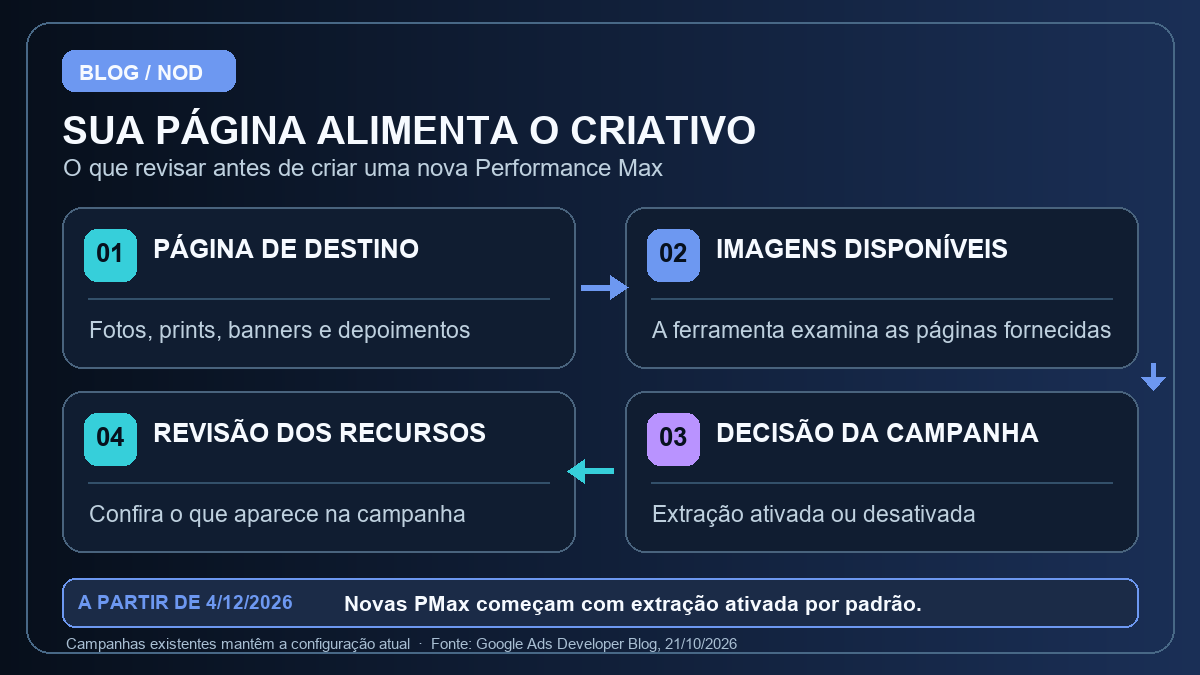
Fluxo de revisão da extração de imagens em novas campanhas Performance Max: página de destino, imagens disponíveis, configuração da campanha e inspeção dos recursos.
The checklist before creating a PMax
- Open the page as a visitor. See images on desktop and mobile, including sections below the fold. A creative can be technically available and still be unreadable out of context.
- Separate what can become an advertisement. Check authorization to use photos, marks, testimonials and images of third parties for commercial purposes. Google recommends reviewing the rights to images posted on the landing page.
- Update temporary parts. Price, date, bonus and Black Friday offer expired should not stay on the page waiting for automation to understand the history.
- Review the new campaign, not just the bill. If the team or an integration creates campaigns by API, set up explicitly
GENERATE_IMAGE_EXTRACTIONasOPTED_OUTwhen the intention is not to extract images. If the intention is to use the feature, document the choice. - Do the inspection after launch. Check which features appear in the campaign and whether they are consistent with the promise of the page. A correct configuration does not replace visual review.
And who creates campaigns for API?
Na API of the Google Ads, the definition is in campaign.asset_automation_settings, with the guy GENERATE_IMAGE_EXTRACTION and status OPTED_IN or OPTED_OUT. When updating this field, beware: it is a list replaced in its entirety. It is also necessary to recover and resubmit the other definitions that you want to preserve. Do not copy an example of isolated payload for production without checking out the current campaign. The Google's technical communique shows the configuration and a GAQL query for audit.
What changes in the work of those who advertise?
The landing page also functions as a source of creative material. Therefore, the review of the campaign begins before squeeze Publishing. A page with coherent, current and authorized images gives material automation better. A page with old or out-of-context pieces makes room for a surprise that could be avoided.
My advice is simple: create a review step of the landing page images in the campaign checklist. Those who use automated creation flow also need to record the choice of extraction at the campaign level.
What changes between account and campaign
Prior to this change, a campaign without explicit configuration inherited the adjustment of dynamic account images. The novelty is the separation between the two levels. A team may have turned off the feature in the account for months and still create a new PMax with extraction enabled after 4/12. Anyone who already uses images from the page can maintain the new standard as long as they review the available material.
- Existing campaign: check the current setting; the change does not automatically change it.
- New campaign after 4/12/2026: Check the extraction at the campaign level, enabled by default.
- Dynamic images turned off in the account: do not assume that this disables extraction in the new PMax.
- Campaign created by integration: declare the desired option in the flow and check the result.
This change of pattern does not bring promise of reach or conversion. Enabling extraction does not guarantee a better piece; disabling it is not a universal rule. The choice depends on the page images and the communication control the operation needs to have.
Example: a course page with images from different times
Imagine a page with teacher photo, dashboard capture, card testimonials and Black Friday banner. The photo can work off the page. The print with small numbers may be unreadable in a compact positioning. A testimonial may be authorized for the site, but not for advertising. The banner may announce a deadline. Being on the page doesn’t mean being ready to become an ad.
In an e-commerce, the reasoning applies to product photos, freight stamps, comparatives and seasonal arts. The isolated photo may be clear; a seal without the surrounding text can lose meaning. You don’t have to guess the exact image that automation will choose. It is necessary to reduce the set of problematic images before delivering the page to the campaign.
Rapid context test for each image
Choose an important image and imagine that it appears alone, untitled, priced or explanation of the page. Would the person understand the product? Is the promise still worth today? Does the text stay readable on a small screen? Is there proof of the right of commercial use of the photo, mark or testimonial? If any answer is no, adjust the page, image, or campaign configuration.
This exercise is especially useful when the site is updated by a person and the Google Ads by another. A harmless card for those who edit the page can become a consistency problem for those who answer for the ads. Once you’ve created the campaign, examine the features that appear and make sure they’re consistent with the promise of the landing page.
Audit of campaigns created by API
Na Google Ads API, the definition is in campaign.asset_automation_settings, with type GENERATE_IMAGE_EXTRACTION and status OPTED_IN or OPTED_OUT. When updating the field, beware: the list is replaced in whole. Recover and resubmit other definitions that you want to preserve. The Google's technical communique brings GAQL configuration and query for audit.
For operations that create campaigns at scale, register destination URL, responsible for image review, choice of extraction and date of conference. If the extraction setting does not appear in the automation settings, the campaign may be inheriting the account option. The query helps to see this state; it does not justify changing old batch campaigns without reviewing the intention of each.
Where to look at dynamic images in the account
The path indicated by Google is Campaigns → Resources → three-point menu → Automated features at the account level → three-point menu → Advanced settings → Dynamic images. This helps to understand campaigns without explicit adjustment. For new campaigns after the change, also check out the decision at the campaign level.
Consider a school that exchanges class and price on the page, but forgets an old art in the footer. The team creates a new PMax, relying on the global option off. The correct care is to update or remove the art, review the other images and declare the choice of extraction in the campaign. Only then examine the appeals submitted. You can’t say that Google would choose the old art; you can avoid relying on that luck.
Frequently Asked Questions
Is the change true for old PMax campaigns?
Google says existing campaigns maintain their current settings. The new default setting applies to campaigns created from 4 december of 2026.
Turn off dynamic images in the account solve?
Not necessarily for a new campaign after the date of the change. The new campaign standard can be OPTED_IN even with the option of the account off.
Can Google take any image from my page?
The tool can select images from the provided landing pages. This does not prove that they will all be used. Review rights and adequacy of available materials.
Can I stop the extraction?
Yeah. Yeah. Yeah. Google tells you the option OPTED_OUT at the campaign level. The team should check the corresponding path in the interface it uses and the creation streams by the API.