
How to send automatic DM by comment on the Instagram with Manychat
Set up sending links through Direct when someone comments on a Reel. See a real flow, the difference between quick response and link, and how to test with another account.

To send an automatic DM when someone comments on a Reel, select Reel in the Manychat, choose the keyword and connect the trigger to a private response. If you want to deliver the link and continue the conversation, put a quick response on the first DM and deliver the material in the following message.
Who comments STRUCTURE want to open the material I promised in the video. That's why I start with the delivery. What message will the person see? Where does she touch? How do I check if the button opened the right page? Only then does the measuring part come in.
What can you learn from the STRUCTURE case
In the draft of my STRUCTURE flow, Jarvis presents two materials on Direct. The button Watch the video leads to explanation of structures of conversion tracking. The button Check structure lead to the guide with the checks before creating another Pixel. Each choice has its own tag action. Read the guide on when to create another Pixel.
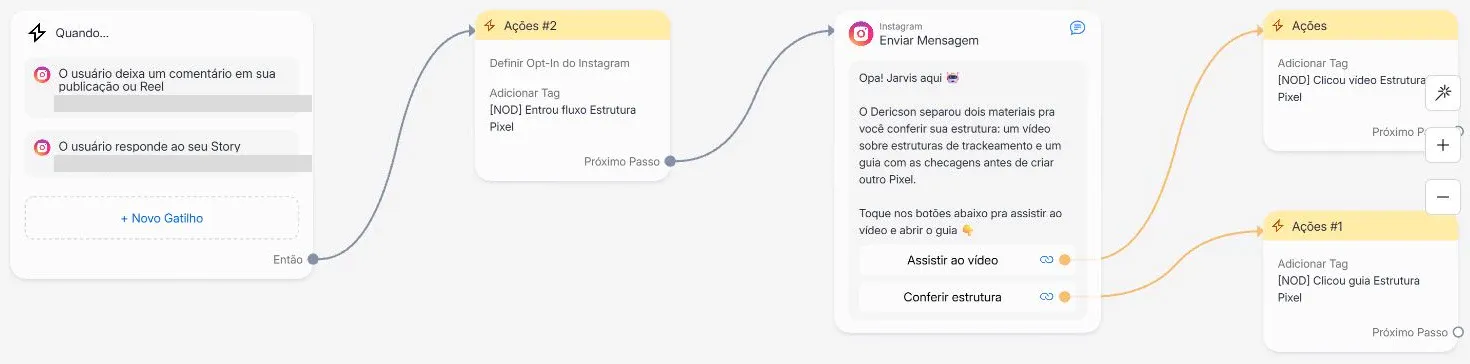
Construtor do Manychat com gatilhos, ações de entrada, mensagem do Direct e duas ramificações de clique
* Draft STRUCTURE after review of 20 october of 2026. Each button leads to a material and triggers a tag of its own.*
The two paths in the DM of the STRUCTURE
The draft has two entries, comment on the post or Reel and response to the Story. In the review of 20 october of 2026, we check the input connections to the message and each button to the tag after reloading the editor. The conference was held in the saved draft and in the internal preview. To reproduce the tutorial, you can start with just a Reel and a keyword.
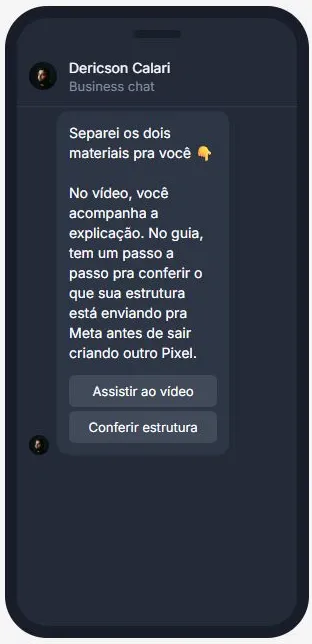
Prévia interna da DM com dois botões, um para assistir ao vídeo e outro para abrir o guia
*Inner preview of a previous revision of the STRUCTURE. See how the two buttons appear in the conversation.*
Instagram Direct
From comment to DM with Manychat
Set up a keyword in Reel and deliver the material promised by the conversation in the Instagram.
- Trigger by comment on a Reel
- Quick response in the first DM
- Buttons to deliver video and guide
Start with a Reel
Check out the plans and features for the professional profile you will connect.
Access the Manychat(opens in a new tab)Affiliate link. I may earn a commission if you subscribe through this link.
Configure automation in the Manychat
1. Connect the Instagram professional
Check if the profile is professional, of the type Creator or Company. No Manychat, enter in Settings → Instagram → Connect, select the profile that published Reel and complete the authorization. The configuration can ask for different steps depending on the connection method. How to connect the Instagram to the Manychat.
2. Use a keyword in a specific Reel
In Automation → New automation, choice Start from scratch and open a blank stream. In the constructor, add the trigger of the Instagram The user leaves a comment in his post or Reel. Select a specific publication or Reel, choose the content and include the word STRUCTURE in the filter. Save the trigger.
In Reel's caption or speech, tell him what's coming. For example, “Comment STRUCTURE that I send you the video and guide on Direct.” If you enable the public response, one option is “Look at your direct. I’ll send you the materials there.” The public response is in the comment. Delivery happens in DM. Configuration of the comment trigger in the Manychat.
3. Send a private response with an option to continue
Connect to the trigger a block of the Instagram Send message and mark Send as a private response. Use a single block of text and add one Quick response. The quick response is the output you connect to the next step of the flow. How to set up quick answers.
Use this opening as a starting point.
“Oop! Jarvis here 🤖 The Dericson has separated a video and a guide for you to check out its structure of conversion tracking. Want to get both?
Use I want the materials as a label of the quick response. When touching it, the person interacts with the DM and opens the default window of 24 hours. A response sent by the person himself can also open the window. For the path of this tutorial, it is the touch in I want the materials that triggers the next step configured. Rules of private response in the Manychat.
From the key word to the delivery of the material
4. Deliver the video and guide in the next message
Call I want the materials to a second message from Instagram. You can present both materials like this.
“In the video, Dericson explains how the structure works. In the guide, you have the checks you can do before you create another Pixel. Choose where you want to start.
Add Watch the video and Check structure as buttons Open website. Paste the final address of each material and test the opening in the own Instagram. If the goal is to deliver a link, the Manychat it allows you to put it in the first private answer. In this format, the button opens the destination and the conversation window is waiting for a valid interaction in Direct. How the Open Website button works on the comment trigger.
That’s the difference that matters most when you draw the flow. Quick response Continue the conversation. Open website Lead to the material. Count the 24 hours from the last valid interaction of the person and deliver what they asked for right there. If the window is closed, wait for a new interaction to resume this automation in Direct. Message window in the Manychat.
If you just need to deliver a material and want a shorter assembly, the model Auto-DM Links from comments It makes that way. Active a Opening DM to use a confirmation button before the message with the link. The visual builder helps when you want to see and configure the actions of each step. How to use the DM model per comment.
What to register with tags and UTMs
When I set up a stream with two links, I want to answer two questions. Who asked for the materials? Which of the two materials did the person try to open?
- Request. On the way out of I want the materials, add an action Add tag, for example
estrutura_pediu_material, before the second message. - Click. If the editor displays Additional actions in the link button, associate a tag with each button, for example
estrutura_clicou_videoandestrutura_clicou_guia. Confirm in the test contact that each touch recorded the corresponding action. - Visit. Use UTMs at the address of a page of yours to identify the visit that arrived by the button. Use the same source, media, and campaign values for this stream and change
utm_contentWhen you want to differentiate the buttons.
For example, in the guide button you can use such an address by switching example.com for their dominance.
https://example.com/guia?utm_source=instagram&utm_medium=dm&utm_campaign=estrutura&utm_content=botao_guiaRecord what happened at each point. A click tag marks an action on the button. On your page, check if there has been a visit with the expected UTMs. Registration, qualification and purchase have their own confirmations. When I collect and keep this data on my own basis, I'm doing first-party data collection. When I send the confirmed event to the traffic platform, I'm doing conversion tracking. How to track leads and sales in the Instagram Direct and send conversions to Meta.
Test from comment to destination
- No Preview of the Manychat, read the DM, tap the buttons and follow where the connections go. The builder preview helps to review what has been assembled. How to view automations in the Manychat.
- Use a Reel that you can activate for a controlled test. Check out the selection and click Publish (*Set Live*). When editing an already active flow, use Update (*Update*) to apply the review.
- Enter the app of the Instagram with another account that has not yet commented on that Reel. Make the first comment with STRUCTURE. Look for the first message in Direct and check it out Requests, especially if this account does not follow the profile. As the Instagram delivers private answers.
- Check that the message with the material arrives after touching I want the materials. Open the two buttons, confirm the destinations, and verify that the configured tag actions have appeared in the test contact. If you are measuring the page, confirm that the visit has arrived with the UTMs.
- Use another account that you haven’t commented on yet to make a first comment without the keyword. Check that it stays out of the flow. To repeat the positive test, use a new test Reel or other account without prior comment on that Reel. Rule of the first comment.
When the DM doesn't arrive
What happened | What to check |
|---|---|
I made another comment and the DM didn't come | The trigger of the Manychat consider the person’s first comment on that post or Reel. Make the first comment from a new account to that Reel already with the correct word. |
No one received the first DM | Check if the flow is active, if the selected publication is the right one, and if the keyword and first block are configured. Also look for another active trigger with the same scope, especially one that accepts any comment. |
The DM arrived, but the material did not appear later | See if the person has touched on the quick response and if that path is linked to the delivery message. If the first DM button opens a website, the material must press on the configured destination. |
Reel disappeared from the selector or the shipment stopped | Check the connected profile and option Allow access to messages in the connected tools of the Instagram. No Manychat, use Help → Update permissions and retrace the test. If there are other apps serving the account, review the conversation routing. |
Diagnosis of automations of Instagram no Manychat. Configuration of the routing of conversations.
If your first Reel has already fulfilled the promise made in the caption, replicate the flow to the next one and exchange the word, the destinations and the tags together. So you know what content the person asked for and can check what happened next.