
Conversion tracking on Shopify: why the purchase event may disappear at checkout
Understand why a Shopify Web Pixel can block fetch/XHR for a samepoint-origin endpoint at checkout. Here’s how to diagnose events and validate the path to sale.

Did the purchase go away at the Shopify checkout?
Receiving page_viewed or other events from the showcase does not prove that the purchase has reached its collector. Shopify Web Pixels run in isolated environments, and the request method and destination make a difference. In a test published by Stape in 19 october of 2026, calls fetch and XHR from checkout to an endpoint in the store domain failed with RestrictedUrlError, while shipping to a collection subdomain worked. This result guides the investigation; it is not a universal rule nor a test done by me in your store.
Imagine a shop with 100 orders in the Shopify dashboard and a media report with fewer purchases. The common reaction is to open the ad manager and check the API of Conversions. But first it is worth asking: What stage did the event disappear at? A product view captured in the showcase does not prove that the checkout sent the purchase. And a Purchase received on the platform does not prove that it corresponds to a real, unique and accurate request.
This guide separates these steps, shows you how to reproduce a failure with an identified request, and helps you decide when a different collection route makes sense. The goal is to exchange the diagnosis “the pixel looks green” for a check that accompanies the end-to-end sale.
First-party data collection and conversion tracking they are different stages
First-party data collection is to collect and store the journey on its own base. Conversion tracking is to inform traffic platforms of the valid events and data that you have decided to share. The distinction avoids looking for the failure in Meta or Google when the event did not even reach its structure.
“The first-party data collection leaves the person smart. The conversion tracking leave the platform smart.
If the order exists on Shopify, but the event did not enter the collector, investigate the collection, Web Pixel context, and destination of the request. If the event has entered the base but does not appear on the platform, investigate the processing, mapping and delivery to the platform. The same difference applies to any server provider, gateway, or tag tool.
Infographic: the five proof points of a purchase
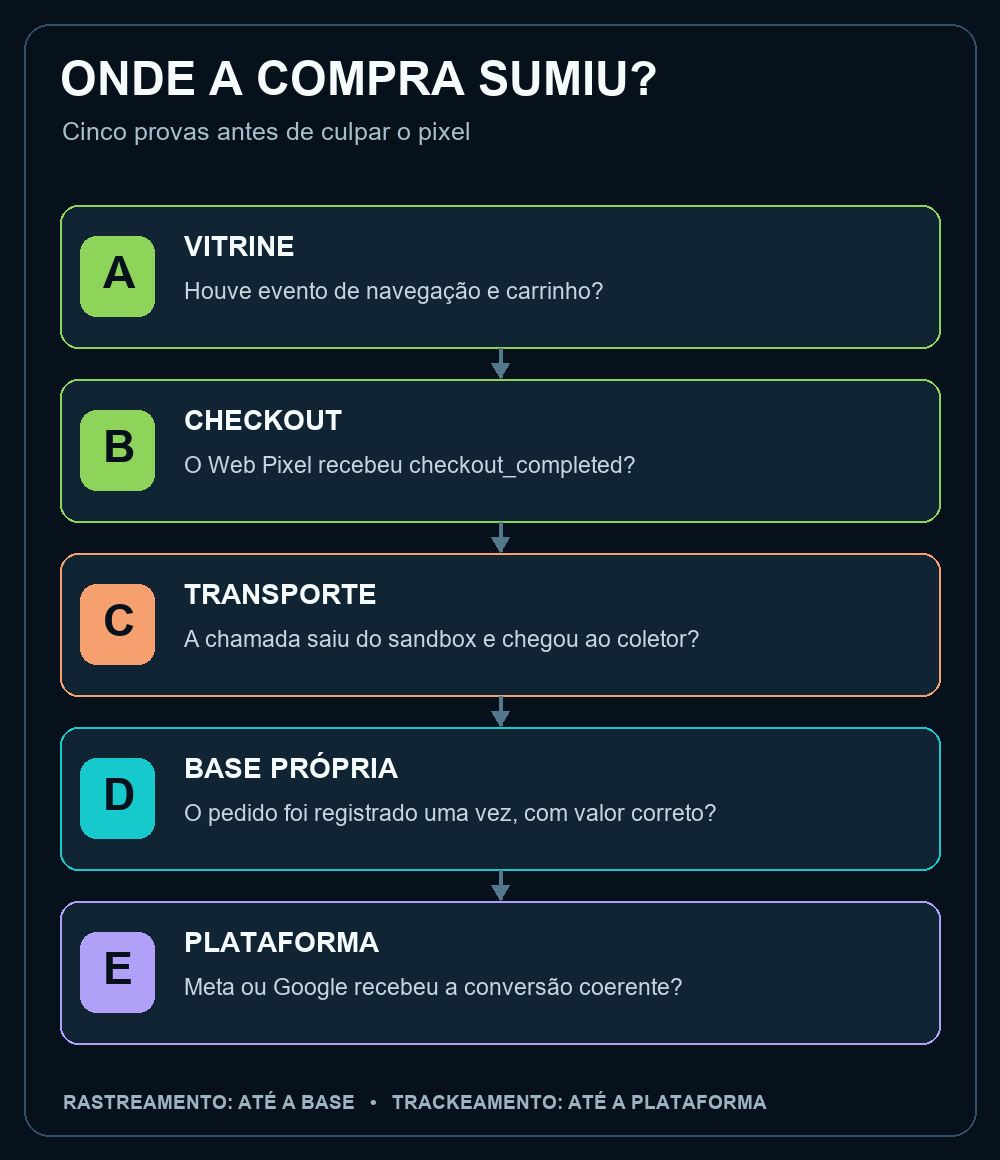
Infográfico com cinco etapas para diagnosticar compra Shopify: vitrine, checkout, transporte, base própria e plataforma
- A — Step: Showcase; Question that needs proof: Were there any navigation events and cart?
- B — Step: Checkout; Question that needs proof: Did the Web Pixel receive checkout_completed?
- C — Step: Transportation; Question that needs proof: Did the request come out of the sandbox and reach the collector?
- D — Step: Own basis; Question that needs proof: Has the request been persisted and dealt with against duplicates?
- E — Step: Platform; Question that needs proof: Did Meta or Google receive value, currency and coherent identifiers?
Visual Flow: showcase → Shopify checkout → collector → own base → traffic platform. The picture is a diagnostic roadmap, not an assertion that every store uses exactly these components. Shopify's official catalog distinguishes page_viewed, checkout_started and checkout_completed. Do not replace one with the other just to make a report hit. To test purchase, start with a completed order and the corresponding event.
Why can the showcase work while the checkout fails?
In the showcase, a theme script can run in the normal context of the page. Shopify Web Pixels host events for one API and operate in sandbox. App extensions use a strict web worker-based environment; custom pixels use an ixa sandbox in iframe. The official documentation warns that common browser features can behave otherwise or not work in this isolation.
There are two ideas that are usually mixed. Same-origin describes the combination of protocol, host and port. A page in store.examplo.com and a route /collection on that same host share the origin from the point of view of URLs. Context of execution describes where the code actually tries to make the request. A URL in the store domain does not make the checkout Web Pixel become a normal theme script.
Shopify documents the architecture of the sandboxes, but does not establish on this page a universal rule for the specific error RestrictedUrlError. The experiment on this error was Stape, which tested shipping methods and destinations. Treating fonts separately is important: the official documentation explains the model; the vendor test shows an observed behavior in a configuration.
What the test of Stape showed
In the experiment published in 19/10/2026, a same-origin endpoint in the store domain and a collection subdomain were tested at checkout. The reported result was this:
- Image GET — Endpoint in the store domain: Worked in the test; Collection subdomain: Worked in the test
- sendBeacon — Endpoint in the store domain: Worked in the test; Collection subdomain: Worked in the test
- fetch POST — Endpoint in store domain: RestrictedUrlError; Collection subdomain: Worked on the test
- XHR POST — Endpoint in store domain: RestrictedUrlError; Collection subdomain: Worked on the test
“Some event has arrived” does not equate to “all methods work.” An image pixel can generate visible signals while a programmatic call used for another event fails. In the experiment, the error occurred before fetch or XHR reached the server. If the collector did not receive anything, editing the Meta tag that runs after the collector does not solve this first failure.
The test doesn’t say that every Shopify store will have the same result. Pixel type, code, endpoint, consent, CORS, configurations, and platform changes need to be examined in concrete implementation. It also does not turn the subdomain into an automatic solution for missing orders for other causes.
Example: two requests with similar symptoms and different causes
Suppose the test request #EXAMPLE-1042 was completed at the 14h05. In the showcase appear page_viewed and product_added_to_cart; the Web Pixel of the checkout receives checkout_completed. When making fetch for store.examplo.com/collection, the console shows RestrictedUrlError. The collector does not register entry and the own base does not have the request. In this scenario illustrative, the first hypothesis is in the transport between points B and C of the infographic. Adjusting the purchase value in the Meta tag does not yet reach the cause.
Now suppose that the request #EXAMPLE-1043 arrives at the collector, appears on the base, but the platform counts two purchases. Transportation works. The investigation goes to deduplication, event identifiers and submission rules. The same superficial symptom — wrong count — requires a different correction. These stories are didactic examples, not results of a store audited by me.
Lastly, if Shopify records the order and you do not observe checkout_completed, before ordering the endpoint check that the pixel is configured to receive this event and that the privacy choices allow its execution. In regions that require consent, Shopify explains that callbacks of app extensions run after authorization; previous events can be played later. The test needs to consider this context.
How would I investigate an absent purchase
- I would start with an identified test request. Time note, ID, value and currency expected, without exposing personal data in prints or public logs.
- It would separate showcase and checkout. I would test the two steps in the same flow, because a showcase event does not prove the checkout collection.
- I'd write down the type of Web Pixel. Custom app and pixel extension use distinct environments; don’t assume that an observation is equally true for both of you.
- Look method, URL and error. In the test environment, you would check if the shipment uses image, sendBeacon, fetch or XHR and goes to the store domain or subdomain. I would look for RestrictedUrlError without assuming that every console error has the same cause.
- I would check the receipt on the server. If the request came out, it would look HTTP response, CORS, parse and persistence. If it was blocked before leaving, it would not start with the target tag.
- I would reconcile the sale. I would compare order, event on its own basis and send to the platform, using stable identifiers and avoiding duplicate Purchase.
- I would repeat with the relevant scenarios. Consent, desktop, mobile and methods used of truth by the structure can change the conclusion. An isolated test brings a clue; repetition brings confidence.
A simple table makes the evidence comparable:
- #EXAMPLE-1042 — Shopify event: checkout_completed; Transportation: fetch to store domain; error; Collector: Not received; Own base: No registration; Platform: No shipment
- #EXAMPLE-1043 — Shopify event: checkout_completed; Transportation: fetch to subdomain; Collector: Received; Own base: A purchase; Platform: A purchase
These lines are hypothetical. The value of the table is to require evidence in each column. When a column is empty, you know where to continue. Record value and currency at the private conference, but do not publish buyer data, tokens, or full payloads.
When to consider two collection routes
If the test demonstrates that the same-origin endpoint works in the showcase and fetch or XHR fails the checkout Web Pixel, it is worth evaluating a specific route for the checkout in a collection subdomain, as in the hybrid arrangement described by the Stape. Route selection needs to take place before of the request. Then it is necessary to check DNS, CORS, receipt, consent and the final destination of the event.
- Showcase — Possible route: loja.examplo.com/collecto; Final destination: Collector → own base → platforms
- Checkout — Possible route: collect.exemplo.com; Final destination: Collector → own base → platforms
The drawing brings together two entries in the same structure. An HTTP 200 of the subdomain proves that a call has been accepted; it is still necessary to check that the sale was persisted correctly and sent only once. Before changing a published operation, document the current state, test in appropriate environment, and maintain reversal path.
It is also not enough to exchange the URL to pursue a supposed attribution improvement. In the sandbox, cookies and context may differ from those of the showcase. What matters is checking which identifiers actually accompany the event, which can be associated with the order, and what is permitted by the buyer’s consent.
My rule of decision is simple: the account of the Stape turns a hypothesis, not a migration order. If the order exists, the event reaches the base and the platform receives a coherent purchase, there is little reason to change the route just by trend. If a gap appears repeatedly at the same point, correct that step, repeat the test, and compare the results. This is how the operation ceases to depend on a “pixel note” and begins to know how to explain each purchase.
Frequently Asked Questions
If PageView arrives, is the purchase being measured?
Not necessarily. page_viewed and checkout_completed are different events and can use distinct contexts and methods. Validate the purchase from a completed order to the collector, base and platform.
Does RestrictedUrlError mean my server has crashed?
Not by itself. In the test of Stape, the error occurred before fetch or XHR left the Web Pixel environment. Check method, URL, and logs before assigning the fault to the server.
Does every Shopify store need a subdomain for checkout?
It is not possible to complete this from the test of a supplier. The subdomain is alternative to the scenario in which the method used in the checkout is blocked on the same-origin route and works on the alternative route.
Which standard event represents a completed purchase?
Shopify describes checkout_completed as the purchase completion event. The operational confirmation requires to reconcile it with the order and with the shipment made later by its structure.
The fault is of first-party data collection or of conversion tracking?
If the event does not reach its base, there is first a gap in the first-party data collection. When it is at the base but does not arrive correctly to Meta or Google, investigate the conversion tracking. These are linked steps, but they require different evidence.
Sources and limit of analysis
- Shopify Developers, About web pixels: https://shopify.dev/docs/apps/build/marketing/pixels
- Shopify Developers, Web Pixels API: https://shopify.dev/docs/api/web-pixels-api
- Shopify Developers, Standard Events: https://shopify.dev/docs/api/web-pixels-api/standard-events
- Stape, Shopify same-origin tracking, 19/10/2026: https://stape.io/blog/shopify-same-origin-tracking
RestrictedUrlError behavior and method comparison come from the test of the Stape. They are not measurements of my operation or universal rule affirmed by Shopify documentation. The diagnosis of a specific store depends on own orders and logs.