
Conversion tracking and First-party data collection of WhatsApp: The Definitive Guide
The most complete guide to conversion tracking and first-party data collection of campaigns of WhatsApp. Single identifier, API of Conversions, ctwa_clid, N8n, dashboards, LGPD and compared tools.

If you are a traffic manager and invest in campaigns of WhatsApp, knows that the great pain is: how to track where each came from lead and every sale? Without first-party data collection, you're throwing money in the dark.
In this definitive guide, we will cover absolutely everything about conversion tracking and first-party data collection of campaigns of WhatsApp: since the first-party data collection via site with unique identifier up to advanced settings with API of Conversions, N8n, dashboards and compliance with the LGPD.
This is the most complete guide to the internet on the subject. Come on. Come on.
What is it First-party data collection vs. Conversion tracking of WhatsApp?
First of all, we need to differentiate two concepts that many people confuse:
First-party data collection — Collection of external data
First-party data collection is the collection of data on the Origin of their leads. Where did he come from? What campaign? What ad? Which creative? We use tools such as Unique identifiers, Navigation cookies, and Session data for that.
The goal is to answer: "Where did this person come from?".
Conversion tracking — Measurement of internal actions
Conversion tracking focus on the actions that the lead performs within the WhatsApp: opened the conversation? Answered? Qualified? Did you buy it? We use a API of Meta Conversions and webhooks to record these events.
The goal is to answer: "What did that person do?".
Why do most traffic managers get it wrong
The most common mistake is to think that it is enough to run a message campaign in the Meta Ads and "see results" in the manager. The problem: Meta only shows Messages initiated, does not show real sales, qualification or ROI.
Without a system of first-party data collection + conversion tracking, you don't know:
- Which campaign generated the most sales (no leads — sales)
- What is the cost per real sale (not the CPM or CPC)
- Which creative converts best into recipe
- Where do the leads more qualified
- What is the real ROAS of your campaigns of WhatsApp
The 2 Methods of First-party data collection to WhatsApp
Method 1: First-party data collection via Site with Single Identifier (No Form)
This is the most powerful method to track leads which come from your website to the WhatsApp — without needing a form. The idea is simple and genius:
How does the system work
When a visitor accesses your site, the system automatically generates a unique identifier (ID) for that session. This ID works as a digital fingerprint of the visitor.
- Generation of the ID: As soon as the visitor loads the page, a unique identifier is created and associated with the session of the page
- Collection of navigation data: In parallel, the system captures and stores in the database all relevant data: UTMs (source, medium campaign), paid traffic cookies (fbclid, gclid), IP, city, entry page, referrer, device
- Injection into the message of the WhatsApp: When the visitor clicks on the button of WhatsApp (which can be a simple link, without a form), the identifier is inserted in the pre-programmed message — either as a visible or hidden service protocol in the body of the message
- Data cross-check: When the message arrives in your WhatsApp Business via webhook, the system extracts the identifier and makes the complete cross-check with all the browsing data stored in the bank
What you can know about each lead
With this intersection, you have access to Everything about the lead before you even reply to the first message:
- Origin of traffic: utm_source, utm_medium, utm_campaign complete
- Click IDs: fbclid (Meta), gclid (Google), msclkid (Microsoft)
- Geolocation: city, state, country based on IP
- Behavior on the site: pages visited, time on page, exit page
- Device: desktop, mobile, operating system, browser
- Referrer: which website/platform did the visitor come from
- History of visits: if you have visited before, how many times, last visit
Advantages of this method
- No form — The button of WhatsApp it works directly, without friction. The visitor clicks and already goes to WhatsApp with the message ready
- 100% of the data — You capture everything before the click, it doesn’t depend on the lead fill in nothing
- Works with any campaign — Meta Ads, Google Ads, organic, email marketing, indication — everything is tracked
- No dependence on API Officer — For the first-party data collection in itself, you only need the webhook to receive the message. A API Official is required only for the conversion tracking of events back to the platforms
See the full mind map of how the system works:
Method 2: Meta Message Pixel (Direct Campaigns for WhatsApp)
The Pixel Message is an exclusive resource for campaigns of Click-to-WhatsApp (CTWA) no Meta Ads. It allows you to track the user journey from ad click to conversation in the WhatsApp.
How to create the Message Pixel
- Access the Meta Event Manager
- Click on 'Connect Data Sources'
- Select 'Messages' as font type
- Link to your WhatsApp Business
- The Message Pixel will be created and linked automatically
The parameter ctwa_clid
When someone clicks on your CTWA ad, Meta generates a unique identifier called ctwa_clid. This ID is sent via webhook when the conversation is started in the WhatsApp.
The ctwa_clid is a Golden Key of the conversion tracking — it connects the click on the ad to the conversation in the WhatsApp, allowing precise attribution.
See how the direct campaign system works in Meta for WhatsApp:
API of Conversions of the WhatsApp (CAPI)
The most powerful method for return conversion data to the Meta Ads. Allows you to send conversion events directly from your server.
Events available at API of Conversions
A API from Conversions to Business Messaging supports the following events:
- Purchase — Completed sale (the most important)
- LeadSubmitted — Lead sent contact details
- QualifiedLead — Lead qualified by the team
- InitiateCheckout — Started purchase process
- AddToCart — Added item to cart
- ViewContent — Viewed content/product
- OrderCreated — Request created
- OrderShipped — Request sent
- OrderDelivered — Request delivered
- CartAbandoned — abandoned cart
- RatingProvided — Assessment provided
How it works in practice
- Webhook receives message: When someone sends a message in your WhatsApp Business via API, the webhook receives the ctwa_clid
- Its automation processes: N8n, Make or custom code identifies the stage of the lead (new, qualified, buy)
- Event is fired for the CAPI: POST request for graph.facebook.com with the event, ctwa_clid, value and currency
- Goal attributes the conversion: Meta uses the ctwa_clid to connect conversion to the original ad and campaign
How to Set up Conversion tracking with N8n (Step by Step)
That is the solution I use and teach. With N8n + API Officer, you have total control about your data without relying on expensive tools.
System Architecture
- WhatsApp Business API (Meta Cloud API or provider) → receives messages and generates webhook with ctwa_clid
- N8n → receives webhook, processes data, identifies stage of the lead
- PostgreSQL → store leads, conversions, UTMs and attribution data
- Meta CAPI → N8n triggers conversion events with ctwa_clid
- Data Studio → visual dashboard connected to PostgreSQL
Step 1: Configure the webhook no N8n
Create a new workflow in the N8n with a knot Webhook. Copy the webhook URL and configure in your dashboard API of the WhatsApp as callback URL for incoming messages.
Step 2: Extract the ctwa_clid or unique identifier
In the webhook of N8n, the ctwa_clid come in the field referral.ctwa_clid of the message payload (for CTWA campaigns). To leads coming from the site, extract the unique identifier from the pre-programmed message.
Step 3: Save to the database
Use a knot PostgreSQL (or MySQL) to insert the lead with: telephone, ctwa_clid or identifier, utm_source, utm_medium, utm_campaign, date/time, and initial status.
Step 4: Shoot event for a CAPI
Use a knot HTTP Request to make a POST for a API of Meta Conversions. The payload should include: event_name, event_time, action_source ('business_messaging'), messaging_channel ('whatsapp'), and the ctwa_clid.
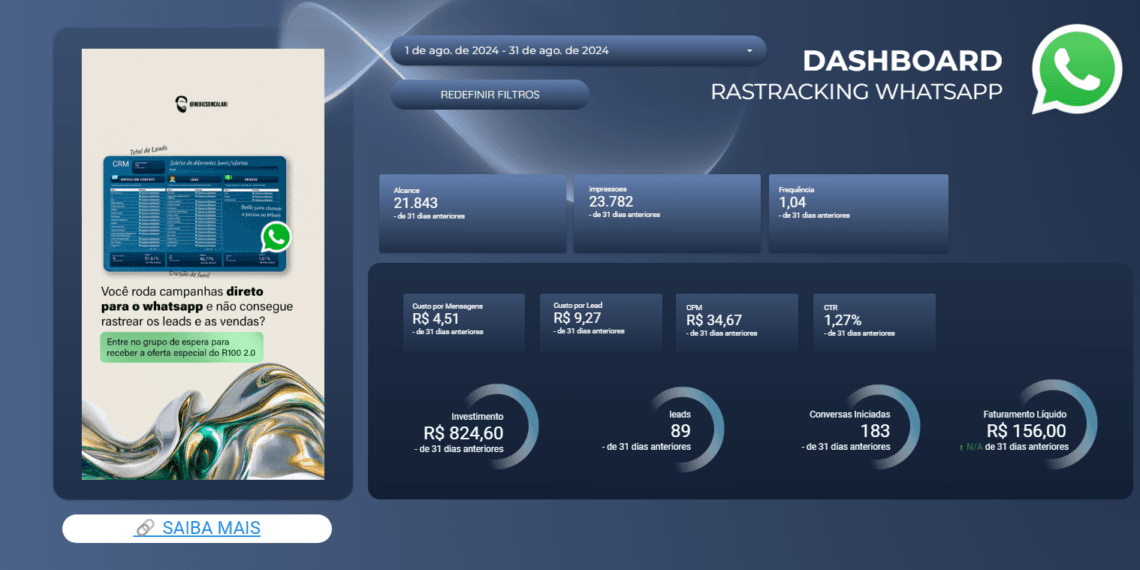
How to Create Performance Dashboards in Data Studio
With the data in PostgreSQL, connect the Data Studio to create visual performance dashboards.
Essential metrics to accompany
- Cost per Lead REAL (CPL) — Investment / Total of leads received in the WhatsApp
- Cost per SALE REAL (CPA) — Investment / Total sales confirmed
- ROAS REAL — Total revenue / Total investment (the indicator king)
- Qualification Rate — Leads qualified / Total of leads
- Connect Rate — Conversations started / Clicks on the ad × 100
- Conversion Rate — Sales / Leads qualified
- Average Ticket — Revenue / Number of sales
How to Calculate Real ROAS
“ROAS = Revenue generated by the campaigns of WhatsApp ÷ Investment in ads
For example, if you have invested R$5.000 in ads and generated R$25.000 in tracked sales via WhatsApp, his ROAS is 5x — that is, each R$1 invested returned R$5.
Connect Rate: The metric that no one talks about
“Connect Rate = (REAL Initiated Conversations ÷ Clicks on the Ad) × 100
A Connect Rate below 30% indicates problems in the funnel: misaligned copy, slow response time, or number of WhatsApp with low reliability.
LGPD and Conversion tracking of WhatsApp What You Need to Know
API Official vs. API Unofficial — Legal Implications
- API Official (Meta Cloud API / BSPs) — Authorized by Meta, uses official endpoints, is safe and legal
- API Unofficial (Baileys, Evolution API) — Uses reverse engineering of the protocol of the WhatsApp. Violates the Terms of Service and may cause ban.
Real risks of using API unofficial (we use but you need to be aware):
- Permanent ban on the number of WhatsApp
- Loss of Meta Business Manager
- Possible suspension of the account of Google Ads (by association)
- Legal liability under the LGPD for collection without consent
Legal basis for data collection
Under the LGPD, you need a Legal basis to collect and process data. The most common bases:
- Consent — The lead accepts terms when starting the conversation
- Legitimate interest — You demonstrate that the first-party data collection is necessary for the business
- Contract execution — If the lead is in the process of buying
“Tip: Include an automatic message at the beginning of the conversation stating about data collection. This covers consent.
Advanced Strategies of Conversion tracking
Attribution models for WhatsApp
- First-click — Useful to understand which campaign brought the lead initially
- Last-click — Assigns conversion to the last clicked ad (Gettal standard)
- Multi-touch It distributes credit between all interactions. Ideal for long funnels
A/B Testing with data from conversion tracking
- Different ad copies → which generates more sales (not only clicks)
- Different landing pages → wa.me direct vs. landing page with button
- Different times → when your audience converts more
- Different offers → which proposal generates the largest average ticket
Remarketing with data from the WhatsApp
- Public of leads who started conversation but did not buy → remarketing with offer
- Buyer audience → upsell with complementary products
- Lookalike of buyers → find people similar to their best customers
Google Ads + WhatsApp — How to track
- Use the unique identifier method in the links of WhatsApp the Landing Pages
- Setting up conversions in the GTM when the button of WhatsApp is clicked
- Import offline conversions via Google Ads API using data from your CRM
- Use Enhanced Conversions with email/phone data from the lead
Common Problems and How to Solve
The ctwa_clid it doesn't appear on the webhook
- Make sure the webhook is set to the messages event
- Confirm that the campaign is Click-to-WhatsApp (CTWA), not normal traffic
- Check if the provider of API supports the referral field on the payload
- The ctwa_clid is only sent in the first message of the lead, not in the subsequent
Events do not appear in Meta Events Manager
- Verify that the Message Pixel is active and linked to the WhatsApp correct
- Confirm the dataset_id and access_token in the request CAPI
- Use Meta's Test Events tool for real-time debugging
- Make sure the event_time is in Unix timestamp format (seconds, not milliseconds)
Inconsistent data between Meta and database
- Meta has delay of even 48h to process events — don’t compare in real time
- Check that there are no duplicate events (imply deduplication with event_id)
- Confirm that the time zone is consistent across all sources
Frequently Asked Questions (FAQ)
I need to API Officer to do conversion tracking?
To conversion tracking complete with API of Conversions and ctwa_clid, Yes. To first-party data collection via website with unique identifier, no need — the first-party data collection it happens before the WhatsApp.
How much does it cost to implement conversion tracking of WhatsApp?
It depends on the method. First-party data collection via website with identifier is practically free (only server). Tools like RastrackAPP cost from R$97/month. DIY solution with N8n costs ~R$50/server month + cost of API Official or unofficial.
Evolution API serves to conversion tracking?
It can be used but we do not recommend it. A Evolution API uses the Baileys library, which is unofficial and violates the Terms of Service of the WhatsApp, so may have risks of ban, but the main reason is not this but the inconsistency of bringing the parameters of source_id and ctwa_clid, for some reason she does not bring this information in some messages, which causes loss of information.
I can track sales of the Google Ads by the WhatsApp?
Yes! Yes! Use the unique identifier method on landing pages, configure conversions in the GTM and import offline conversions via Google Ads API.
What is the difference between Meta’s Pixel Message and Pixel?
Meta's Pixel tracks actions on your site. The Message Pixel tracks actions in conversations of the WhatsApp. They are complementary — use both.
I need consent from the lead to track?
Yes, under the LGPD. The good practice is to send an automatic message informing about data collection at the beginning of the conversation.
The conversion tracking works with WhatsApp personal?
No. No. Conversion tracking with CAPI and ctwa_clid it works only with WhatsApp Business API (Official). The first-party data collection via website with unique identifier works with any number, as the first-party data collection it happens on the site.
How does the first-party data collection without form?
The system generates a unique identifier when the visitor accesses the site, captures all browsing data and cookies in the bank, and injects the identifier into the pre-programmed message of the WhatsApp. When the message arrives, the system crosses the identifier with the stored data.
Conclusion
Conversion tracking and first-party data collection of campaigns of WhatsApp it’s not a luxury — it is mandatory for any serious paid traffic operation.
Without data, you are optimizing in the dark. With the methods of this guide, you can:
- Know exactly where each one comes from lead and every sale
- Calculate the actual ROAS of your campaigns of WhatsApp
- Optimize based on data, not on achismo
- Create ultra-segmented remarketing audiences
- Prove ROI to your customers with professional dashboards
Implement today. Your results will thank you.